Archive for Baseball

A Short History of Video Game Baseball: The Magnavox Odyssey

Sometimes it’s easy to forget how young video games as a genre really are. When Ralph Baer’s “brown box” saw commercial release as America’s first home console, the Magnavox Odyssey, The Godfather had been out in theaters a month. The Watergate break-in was in its planning stages. Agatha Christie was still writing novels.

The Odyssey had no sound and no color, just a trio of white squares that could be moved across the screen. Cellophane overlays were affixed to the television screen to create backgrounds. Sadly, no footage seems to currently exist of Baseball in its full glory. Still, while words are meager, we can hope to replicate the experience as best we can.

The Odyssey’s baseball game was not a launch release, but one of a small number of supplementary games that were sold later that year by Magnavox retailers. Many retailers weren’t trained to sell or advertise the add-on games, and they’re consequently rather rare; copies on eBay generally sell in the $100 range, equal to what the system cost in 1972. (That price seems reasonable, and technically is. In 2014 dollars, it comes to $566.35, the going rate for cutting-edge entertainment.)

Baer’s Baseball wasn’t technically the first electronic version: John Burgeson and Don Daglow had previously created games on mainframes at their local universities. These games were more akin to OOTP than to The Show, printing out simulated box scores based on managerial decisions. The Odyssey was the first to reach the American home, and the first to employ actual video. But one of the most striking things about it is how much of a board game it is.

Along with the mylar overlay, which interestingly and necessarily orients home plate on the right side of the screen to work with the Pong-based physics, Baseball came with playing cards, dice, tokens, and cutouts to help track all the information that three white squares couldn’t convey.

1 Magnavox Odyssey

Before explaining the game itself, the controllers also require some explanation. Almost every modern gamepad fulfills the same set of functions, but before Nintendo gave us the D-pad, controllers were a mess. Every one handled inputs differently, and all of them did it badly. The Odyssey’s controllers were plastic cubes with knobs on each end, and the inputs were performed the way one would maneuver an Etch-A-Sketch: the left knob moves your square horizontally, and the right knob vertically. A smaller knob could impart “English” on the square acting as the ball, allowing it to wobble. Developing skill at the Magnavox Odyssey appears to have been as difficult as it was temporary.

Given the limits of what the Odyssey could do, in terms of square-projection, it’s a little surprising how intricate, or how needlessly complicated, Baseball turned out to be. Before play each team generated their lineup by rolling dice to determine each batter’s handedness and batting average, and recorded them on their lineup cards. These statistics altered the difficulty of each pitcher-batter matchup: the strike zone expanded or shrank depending on the skill of the hitter, and the handedness of the batter and pitcher determined the starting count. Hitters on the wrong side of the platoon started the at bat on a 2-2 count, while an opposite hand would only need a single ball to draw a walk. Perhaps ambitiously, the players were expected to update the batting averages of every batter after each plate appearance, depending on their success.

Runners were tracked on a cardboard field set on a floor or table, using tokens of various colors depending on the predetermined speed of the runner. These determined the outcomes of balls in play. A deck of cards randomized certain special events.

Magnavox_Odyssey_Game_Baseball_small

The mechanics of the actual gameplay, in contrast, are straightforward and even evoke the possibility of fun. The ball is flung from the left side of the screen, crosses over the pitcher’s mound, and hurtles toward the plate. There the batter’s square waits. The pitcher can twist the ball in the final 60.5 feet to sneak it past the batter, and if he does so in the correct range, the batter is out. If the batter’s square collides with the ball, it rockets back the other direction, where he tries to reach the left side of the screen, twisting it unrealistically to evade the fielder’s grasp. Depending on where along the overlay it left the screen, the hit is either a foul, a single, a double, or (depending on the luck of a card draw) just about anything.

The rules also allow for sacrifices flies and bunts, pickoff attempts and steals, and even balks. Play continues until nine innings are complete or, more likely, one’s patience is depleted.

It’s difficult to assess Odyssey Baseball. As the original home console, there’s absolutely nothing to compare it to: imagine the excitement and novelty of the Wii remote, and extend that to the entire concept of controlling the display of your home television.

Needless to say, it’s not something worth hunting down on eBay. The graphical limitations and the cumbersome controls would make it useful for no longer than a single experimental play-through (though you can try it here if you’d like). And its four pages of rules feel two pages too long, in what was to be the first instance of a recurring theme: the eternal conflict between realistic simulation and fun arcade experience. But there is actual fun to be had. It’s the same core concept that made Pong a smash hit two years later. It’s the reflex-based timing and tension of the pitcher-hitter matchup, distilled down to a useless white powder. It’s a good start.

It would be a long time, in fact, before video game baseball got this fun again.

Has MLB.tv Finally Fixed Their Web Player?

For people who want to stream sports on their computers and devices, baseball fans have it pretty great. MLB.tv was really the first of the big four sports to offer live game streaming via the web, and the progress made by MLB Advanced Media has been strong, if not without its problems. It can be buggy, it can be laggy, but it allows us to watch baseball online with a reasonable success rate. But with all the advancements made for mobile viewing, simple web-based viewing has seemed to take a step backward.

Beyond my work here, I also occasionally contribute baseball writing to our sister site FanGraphs. In some cases, I’m looking to capture a GIF of a certain pitcher or a certain play. I know how to capture and convert the video — I’ve become fairly quick at it over the past few years. But actually finding the video can be troublesome thanks to the jenky way MLB streams games over web browsers.

In the past, MLB used a plugin called NexDef. I’m not privy to the reasons why this particular plugin was utilized, but I can say that it was crappy and unreliable. But it was needed for more advanced features like the live DVR capabilities and the switching of audio commentary. The biggest problem that I had with NexDef is that it very rarely recognized that it actually existed on my computer. It would constantly ask me to reinstall. Constantly. On both Mac and PC. Support was limited to a few sets of instructions on how to remove and (again) reinstall NexDef, but I don’t recall that ever solving the problem.

Last year, MLB.tv seemed to offer a NexDef-less way to view on the web. This was a welcome change, but more issues seemed to arise. Primarily, the time coding seemed to be all over the place. Say I wanted to grab a clip of Giancarlo Stanton hitting a double. I would look up the game logs and find out that he hit one in the bottom of the fifth inning. I would pull up the game online, and use the web player to switch to the fifth inning. I would not end up there. More often than not, the video would display that the game was about to start. Sometimes it would take me to the first or second inning. Sometimes it would thank me for watching, as the game had already ended. This left me to use the scrubber and the score bug on the video to try and find my way to the fifth inning. It was a long and stupid process.

But 2015 is a new year, and with it, MLB is promising a better version of its streaming service. Among the new features is the ability to watch Spring Training games via mobile and connected devices and the ability to sync Spanish-language broadcast audio. But they also list “web-based HD media player” as a new feature. Maybe there is such a thing as Santa Claus. If I can finally watch an MLB game online without wanting to punch my laptop, the 2015 season is already off to a great start. Heck, maybe my Astros will make a run at the postseason. Well, baby steps, I suppose.

I realize that the way I want to use MLB.tv is different from most everybody else. Still, if a product offers me the ability to jump between innings and batters, it should, you know, actually do that. I’m a baseball nerd, and I will probably always buy MLB.tv, warts and all. But if minor tech issues are turning away more casual fans, that becomes a problem. Readers of this site probably have the wherewithal to follow instructions on removing plugins. The average user does not. If MLB has fixed the tech problems that have plagues the site for years, we might finally have the perfect sports-streaming solution. Well, they’d also have to address the blackout rules. But that’s a different post, isn’t it?

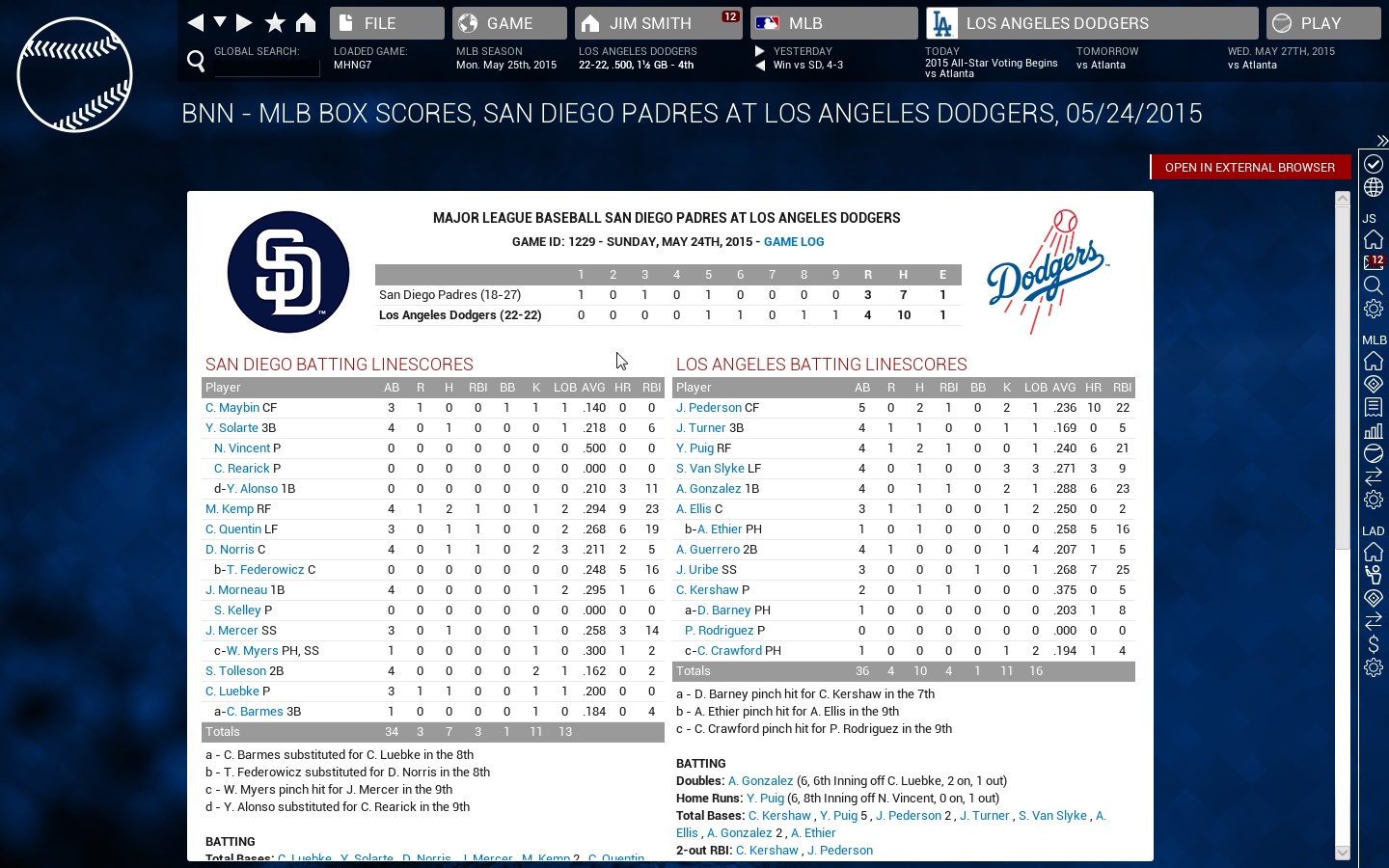
(Image via Twitter)

Zepp Updates App to Provide Personalized Training Tips

The newest update to Zepp’s baseball and golf app includes a new feature to personalize users’ training based on swing analysis.

The feature, called Zepp Insights, will produce reports that recommend drills to help users focus on personalized weakness in their swings. The reports will be delivered weekly, provided the user takes at least 30 swings during that week. Using millions of swings collected from its users, Zepp will identify which of the five calculated swing parameters — bat speed at impact, maximum hand speed, time to impact, vertical angle at impact, and attack angle — is most in need of improvement. The report will then recommend training drills and tips from their existing video library.

The new update will also include swing goals across all metrics based on the user’s skill level. In previous versions of the app, only bat speed goals were set automatically, with additional goals relying on user input to tag the hit type and direction.

In addition to the drills and overviews featuring Cubs hitting coach John Mallee, Zepp also provides swing data and video of a number of MLB hitters, including Mike Trout, David Ortiz, and Giancarlo Stanton. The pros offer advice on more “real-world” scenarios, such as staying back on a curveball and hitting the ball the other way.

CEO Jason Fass said the new update provided personalized, actionable data to its users, better helping them improve their swings.

“Our goal is to provide analysis that not only collects numbers from the sensor, but offers ways to improve those numbers through content in our app,” Fass said. “We need to engage and elevate athletes by personalizing tips gleaned from their captured data.”


Startup deCervo Uses Brain Training to Boost Hitters’ Performance

There are four inches of fresh snow on the Brown University campus, but in a little office in the Pizzitola Center, junior Tim McKeithan is training to recognize sliders and curveballs.

McKeithan is tracking simulated trajectories on a computer screen while wearing an electroencephalograph (EEG) headset. It’s part of a new system developed by deCervo, a New York-based startup, to measure hitters’ decision-making process.

deCervo is led by Jordan Muraskin and Jason Sherwin, who met during their doctorate studies at Columbia University. Although the company is still in its infancy, the pair have been working on the underlying technology for several years, and have been featured in a number of prestigious publications. And teams are starting to take notice — Brown is the fourth NCAA Division I program to work with deCervo, joining Illinois, Bradley, and Ivy League rival Columbia. Sherwin also said the group was “in talks” with some Major League Baseball teams, and hopes to work with professional hitters during spring training.

The program relies on the Advanced Brain Monitoring B-Alert X10, a wireless EEG headset. The nine electrodes are attached to flexible plastic strips, and are evenly distributed around the subject’s scalp. The signals from the electrodes are sampled at 256 Hz and transmitted wirelessly via Bluetooth for storage on a personal computer.

Once the subject is wearing the headset and the signal quality has been checked, the training can begin using deCervo’s custom-designed software. Before each pitch, a pitch type — fastball, curveball, or slider — is displayed on a blank screen for a second or two. The label disappears, and a green “ball” moves according to one of the three trajectories. If the pitch trajectory matches the type displayed at the beginning, the subject presses a key, representing the decision to swing. The program stores the accuracy and response time for each trial, as well as the EEG signals recorded from the headset.

After McKeithan finishes his training and removes the headset, Muraskin processes the data and explains the results. His software allows them to break down the EEG signal into various components, with markers at the trial start, the moment the pitch first appears, and the time of key press. Muraskin also plots McKeithan’s accuracy as a function of reaction time.

“There’s usually a jump around 300 or 350 milliseconds where the player really starts recognizing the pitch,” Muraskin explained. But, to his surprise, McKeithan has improved, and is starting to recognize the pitches around 270 ms.

“That’s really good,” Muraskin said.

deCervo (whose name is from the French for “of the brain”) are not the only company training baseball players’ brains. Aaron Seitz from UC Riverside gave a talk at last August’s Saberseminar on the improvements the Highlanders’ baseball team saw after training with Ultimeyes, his vision training game. And Boston-based Neuroscouting also offers brain training solutions for elite baseball players. And although Sherwin did not claim to be an expert in Neuroscouting’s techniques, he had heard enough to draw a comparison between the two companies.

“In our research we’ve worked with musicians, with soldiers, with athletes,” Sherwin said. “We see that there are certain brain circuits that are tuned towards whatever context or expertise that person has. And we think that our tech is more efficiently tapping in to what those circuits are doing, and how well they’re doing.”

Support for this belief comes from the differences in performance deCervo sees between baseball players and non-baseball players, as well as the difference between players of different skill levels. Sherwin (who has no baseball playing background beyond high school) contrasted his performance while developing the program with that of McKeithan, who correctly determined whether or not to swing 86 percent of the time.

“It’s a very high number that we see consistently with our players,” Sherwin said. “Jordan and I made this experiment and we still haven’t been able to hit 86 percent accuracy, and what’s even more amazing is that their response time is significantly lower than ours.”

Sherwin also explained that better players produced both higher accuracies and lower response times, suggesting that the program could not only separate good from bad players but also identify the strengths and weaknesses of individual players. So Sherwin and Muraskin began developing profiles, based on each subject’s results, to suggest areas for potential improvement.

“Nobody wants to air their dirty laundry on the field,” Sherwin said. “You don’t want to look like a schmuck missing the slider low and away in the game, you’d rather practice that. Better to do it in the privacy of your own home, on an app or something.”

For now, though, deCervo isn’t suggesting specific practice plans for players, but instead are working with coaches to confirm their findings and discuss how coaches will work to fix each player’s agreed-upon weaknesses.

“The first step is having some kind of common ground,” Sherwin said, “Us showing that we’re measuring what we think is relevant for hitting a baseball, and them also recognizing that this is relevant for hitting a baseball.”

And so far, the coaches they’ve worked with have been receptive to the feedback deCervo is providing. Sherwin said he and Muraskin were excited by their early feedback, especially from Brown head coach Grant Achilles.

“Coach Achilles here, his line is emblazoned in my memory, he said, ‘You guys are showing on a statistical and empirical level what we’re seeing with our players.'”

Grant Achilles took over the head coaching job on an interim basis midway through last season, and is about to start his first full season in the top job. Achilles and his staff use a number of advanced metrics to measure his team’s performance, but doesn’t see himself as a sabermetric pioneer.

“Am I somebody that Bill James will be quoting in his book? Probably not,” Achilles said. “But it’s certainly something that’s growing in baseball, and if you don’t pay attention to it, you’re going to be left behind.”

Before coming to Brown, Achilles was an assistant coach at Wake Forest and Georgetown, big-time athletic programs with big-time athletic department budgets. But the comparatively smaller budget of Brown has forced Achilles to think more creatively about ways to improve his players. Achilles first heard about deCervo through an alumnus, who contacted the new coach after reading about the technology in a research journal. Achilles struck up a relationship with the company’s founders, and the Bears began a training program in December. Although it’s too early to see results in game situations, Achilles is already excited by what he’s seen.

“The actual data they’ve kicked back has given traction to stuff that we’ve seen as coaches but you really can’t explain,” Achilles said. “This data gives us a clearer understanding of why guys are either struggling with pitches or doing well in other situations, so it’s truly backed up the results we’ve seen on-field and in practice.”

The immediate future for deCervo, aside from branching into MLB, is developing a single piece of software that teams could use themselves (after some training) to train players and track their improvements over the course of a season. Sherwin and Muraskin also plan to develop a simpler mobile version of the software for players to use without the EEG headset.

“What’s interesting about the app is that given that we’ve done this [data collection] with a bunch of players and a bunch of non-players, we have a database now of what the neural predecessors look like on average in terms of the behavioral metrics,” Sherwin said. “So if we measure the behavioral metrics, we have an approximate measure of what the neural response looks like beforehand, give them an idea of what their most likely neural response is.”

deCervo is also starting to look outside baseball, working with an NHL team to measure how well goalies recognize puck trajectories and offensive formations. The company has also started to work with the Columbia football team, measuring how fast defensive linemen get off the line when the ball is snapped.

“All this stuff we’re doing right now, we’re starting pretty simplistic and building up,” Muraskin said. “There are things [teams] are doing that fit in well with what we’re doing but we would bring a more rigorous, scientific approach.”

Correction: A quote has been changed in the tenth paragraph from “towards whatever concept or expertise that person has” to “whatever context.”


OOTP Gets an MLB License

Out of the Park Baseball (OOTP) announced they now have an official MLB license for the upcoming OOTP 16. I just want to say: I was on the ground floor of this thing. Well, maybe not the ground floor. But I got in before it got all fancy.

I heard about OOTP where most people hear about it — in a job interview, naturally. A guy from some department came hustling over — him being a fan of sabermetrics, him being vaguely aware of my writing — and he eagerly told me about OOTP and its superiority to Baseball Mogul (which I still love). I thank that man for introducing me to OOTP. Thanks, man.

So what does this MLB license mean to the average game player? Well first, it means a game that annually ranks as the best in all of everything is getting better. But more specifically, it means we don’t have to sift through a bunch of competing add-ons or wait for the big special All in One add-on in order to play a game that looks and feels like an MLB entity.

Those are real, honest-to-goodness MLB logos!

For those who haven’t played before, the old way was this:

  • Download the game.
  • If you downloaded the game on day one: Sift through the add-ons for realistic faces and accurate team logos.
  • If you downloaded it maybe a week after the game’s release: Download the All in One mod.
  • Install those mods.

Now, we should be able to:

    • Download the game.

There may still be some mods that throw in international team logos and whatnot, but I expect the average user will be able to download and enjoy a full experience. Oh, also — see the top image — it appears they are making more steps for the in-game 3D stuff.

I am hyped. Everyone else, get hyped too.

Game Reviews:

98 A+ Out of the Park Baseball (OOTP) 2015 (PC)
98 A+ Out of the Park Baseball (OOTP) 2014 (PC)
97 A+ Out of the Park Baseball (OOTP) 2013 (PC)
96 A+ Baseball Mogul ’13 (PC)
96 A+ MLB ’12 The Show (PS3)
79 C+ MLB 2K12 (PS3, XBOX 360, Wii, PC, etc.)
74 C MLB Ballpark Empire (Facebook)

Retro Review:

82 B- MVP Baseball 2003 (PC)


The Mariners Are Now Using LEDs to Light Safeco Field

Night baseball in Seattle, both in person and on TV, will look a great deal crisper thanks to some recent upgrades to Safeco Field. In the first such move in Major League Baseball, the Mariners have replaced their outdated lighting structures with new LED fixtures, which should bring a whole new level of clarity for fans both at the game and on their couches.

LEDs are popping up in all kinds of places including our gadgets, our TVs, and even the bulbs in our lamps. But illuminating a whole baseball field with LEDs should prove to be a very new experience for fans. There will be less glare, more even distribution of light, and the green of the field should really pop under the new lighting.

There are other advantages to the conversion as well. The Mariners are predicting a drop in energy consumption of filed lighting by 60-70 percent. The new bulbs will also last much longer, reducing waste and maintenance costs. TV viewers will get some added bonuses as well, as the lights will not only make the game look better on their HDTVs, but LEDs will also eliminate the flickering effect seen when super-slow replays are presented.

There haven’t been a whole lot of advances in field lighting since the Cubs were the last to install the fixtures in 1988. Though the upfront costs might be significant, the lasting effects and cost savings of LED lighting on a ball field will hopefully make their way to more parks soon. As very few games are played during daylight now-a-days, working to upgrade the fan experience at night would be a welcome addition. Reducing energy usage and waste is certainly a bonus, and watching Robinson Cano bash homers under the best possible lighting should give the fans at Safeco something more to enjoy.

(Image via Dave Sizer)

Whistle Sports Raises $28 Million From Investors Including Derek Jeter and Peyton Manning

Burgeoning digital sports network Whistle Sports announced they closed their Series B round of funding, raising $28 million led by Emil Capital Partners and featuring prominent athletes like Derek Jeter and Peyton Manning as investors.

The network launched in January 2014 and has experienced tremendous growth in only a year, with close to 13 million YouTube subscribers, while gaining 10 million new social followers across their platforms each month. The next closest sports YouTube channel is the NBA at close to six million subscribers.

Their most popular YouTube channel partner is Dude Perfect, the group of Texas A&M alums who got their start making ridiculous basketball trick shots. They have also begun forming content partnerships with professional athletes like Jeremy Lin.

The network’s revenue has been more than doubling each quarter and their videos have been viewed over two billion times. This can be attributed in part to the network’s popularity with the much sought after demographic for advertisers—young males (78 percent of their viewers are male).

Along with pro athlete content partnerships, Whistle Sports has partnered with nearly all major pro sports franchises, including the NFL, MLB, PGA Tour, and NASCAR. In an interview with Forbes, John West, the CEO of Whistle Sports, described the companies relationship with sports leagues, saying, “Each is a true partnership, in which they give us access to their libraries that we use to co-create content, and then we distribute that content on our platforms as well as theirs. Why did they all choose to partner with us? They’re losing young viewers and they have to adapt and evolve—we’re the vehicle to make that happen.”

With nearly 40 percent of their viewers from outside the US, the company has recently opened an office in London and is planning opening another in Latin America this year.

Given their amazing growth and plans to go international, Whistle Sports is now a giant in the digital media space, building in one year what took others like VICE years to do.

(Photo by George Bush Presidential Library and Museum via Flickr)


Finally, a Robot Turtle that Doodles in the Sand

Perhaps this is the robot device that will bring future generations to their knees in anguish and empathy for our generation, but alas it exists:

Yes, BeachBot is a little robot turtle that draws stuff in the sand. Using its little cold metal fingers, it tirelessly scrapes designs into a Swiss beach near you. Why does this matter? What does this project merit that it should pull, by my count, eight engineers away from the matters of world hunger and missing sock matches? Well here’s an obvious item to me: beach sports.
Read the rest of this entry »


Building a Retrosheet Database – Part 2

Welcome back to TechGraphs’ series on building your own Retrosheet database. If you haven’t already, go back and read part one. If you are interested in actually following along on your own system, you must do some work up front, which all mentioned in that article. If you’ve made it past that point, you’re ready to actually load some baseball data.

Before I get too far into things, I should mention that much of what I will be presenting is an updated version of Colin Wyers’ article at our sister site The Hardball Times. That article is how I first learned to do this install, so many thanks are owed to him for laying down the groundwork.

(Note: a lot of these processes will take a good deal of computing resources and time. Be prepared to wait a good deal for these to complete. I would recommend doing this during a time you won’t need to do much else on your computer.)

The first step is to download the .zip file that will contain all the batch files and folder structure you will need. There are two options; one for 32-bit machines and one for 64-bit machines. The files are essentially the same, but the file paths in the scripts vary slightly. Check back with part one if you don’t know if you have a 32- or 64-bit machine. There are instructions on finding out toward the bottom of the article.

Download the proper file and extract it into a new folder on the C:\ drive called Retrosheet, so the result looks like C:\Retrosheet. Open the folder \data\zipped, and run the file get_zip_files batch file. (Note: if you don’t know, batch files are basically strings of code that tell your computer to run multiple processes all at once, saving you a whole lot of clicking.) When you run the get_zip_files file, you’ll notice a lot of scrolling text in the Command Prompt. This is a good thing. Basically, your computer is downloading all the game files from Retrosheet and unzipping them into usable files. If you back up to the \data\unzipped folder, you’ll notice all the .EVA and .EVN files that were just downloaded. This is the format Retrosheet used for their files. We’ll be using a program called Chadwick to turn these files into MySQL data. Also in that folder are three batch files — $cevent, $cwgame, and $cwsub. Running these files will parse the data through Chadwick and place the resulting .csv files in the \data\parsed directory. Run each script one time. Be patient, these processes can take some time. You can minimize the Command Prompt window, but DO NOT CLOSE IT. Closing the window ends the process, and you’ll have to clear out the parsed directory and start over again. When the window closes, the process is done and you can run the other two processes.

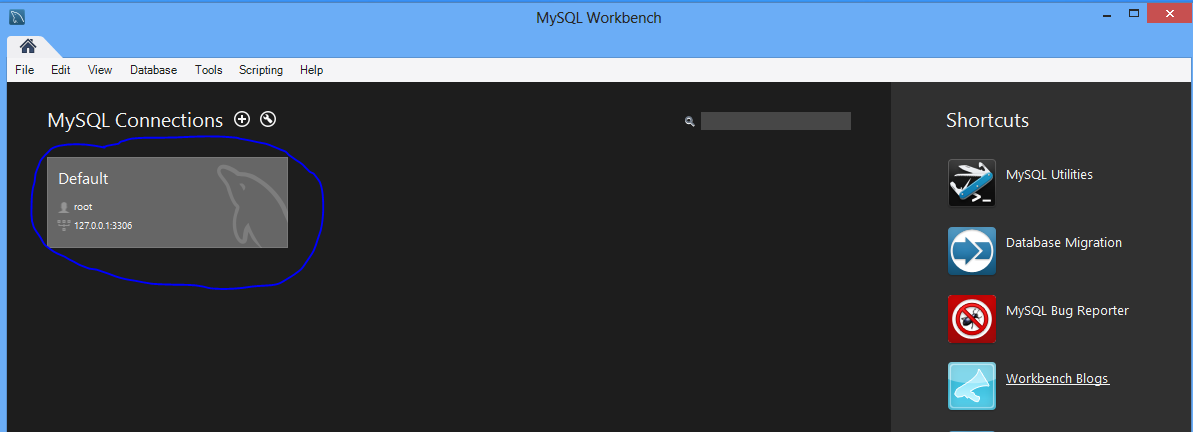
Now, it’s time to get our hands a little dirty with MySQL. Open the MySQL Workbench that we installed in part one. There should only be one connection to choose from at this time.

part2snip1

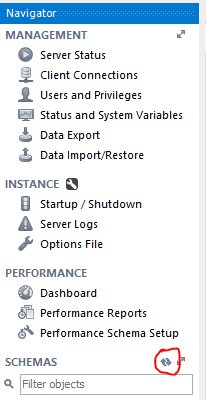
Double-click and enter the root password you created to open the workbench. The first thing we need to do is create the proper schema. A SQL schema is basically the bones of the database. It creates the tables and the fields that go into those tables. It doesn’t load the actual data, but it gets everything set up to load the data in. To create the schema, click File > Open SQL Script. Navigate out to the Retrosheet directory and open the “retrosheet table schema.sql” file. It will load the SQL commands into the workbench. In the toolbar right above all the new text, you’ll see a lightning bolt. This button runs whatever is in the editor window — in this case, our schema creation. Click the lightning bolt and let the SQL commands do their magic. When it’s all done, you’ll have to refresh your schema list to see the new Retrosheet tables. One the left-hand window, next to the word Schema, you’ll see a little refresh button. Click it, and the Retrosheet schema should now be visible.

part2snip2

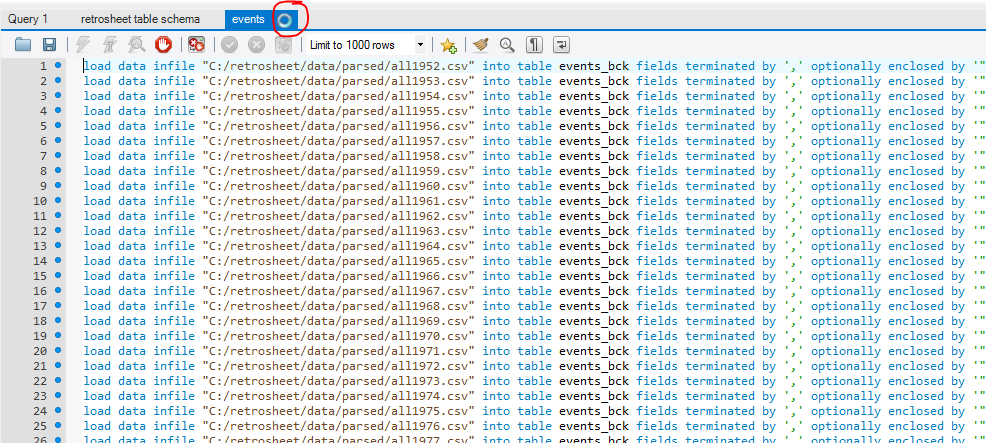
Now, it’s time to fill those schemas. Go to File > Open SQL Script again. This time, navigate to Retrosheet\loaders. These files tell MySQL to fill those tables with the data we extracted in the previous steps. Choose events.sql, and you’ll see the SQL statement load into the workbench. Click the executing lightning bolt again and wait. Then, wait some more. You’ll have to wait for a while.

part2snip3

See that little circle in the tab above your SQL statement? That means a process is running. Wait until that disappears before you run the games.sql and subs.sql files.

Once the other .sql files are run, you’re all done. You’ve done it, you’ve created your very own Retrosheet database.

What exactly can you do with it? Well, I think we’ll save that for the next installment. I’ll go over some basic queries and show you just what your shiney new database can do. Until then, take your time, be confident, and don’t be afraid to sound off in the comments if you have any questions.


Cable Bills Are Going Up In 2015 Due To Sports Programming

With the seemingly inexorable rise in the price of sports programming, it seemed inevitable that cable operators would have to charge subscribers for the privilege of watching American sports. According to Multichannel News, that time has already come with Time Warner Cable, as they have announced that they will be adding a $2.75 sports surcharge to subscribers’ bills starting in January 2015.

In the announcement, Time Warner cable claimed that the cost of cable sports programming has risen 91% since 2008, and according to Patrick Hruby of Sports on Earth, the average cost of a regional sports network has has risen 52 percent over the past five years. This is certainly conceivable with the types of TV deals being reached in the past few years, like the 9-year $24 billion NBA-ESPN deal in October of this year.

In Forbes, Maury Brown noted the irony of Time Warner’s announcement after their struggle to get distribution for SportsNet LA, the regional sports network they manage. The costs of carrying the channel jumped after they made a 25-year deal worth over $8.35 billion  to broadcast Los Angeles Dodgers games. This led to a standoff between TWC and other cable operators like DirecTV for distribution rights, leading nearly 70% of Los Angeles area residents unable to watch Dodgers broadcasts this past season.

After the Supreme Court’s ruling against cable disruptor Aereo, and with John McCain’s Television Consumer Freedom Act having little hope of passage in Congress, there doesn’t seem to be much hope for governmental intervention in the cable arena. Regardless, speculation of an approaching sports cable bubble persists. However, it will likely take years for this bubble to burst, requiring an increasing rate of cord-cutting and rising prices for cable subscribers.

(Header photo via NewYorkTrendNYC)