As our stable of sports management games grows, we realized that we need a great tagline to pull them together. (Kind of like The Big Lebowski’s rug, only without the soiling part.)
We thought about it a lot, and we realized that “We Make the Best Sports Management Games on the Planet” didn’t have the right ring. Markus’ suggestion, “Bow Down Before Us,” wasn’t quite right either.
So we’re turning to you, our loyal fans. As explained in last Friday’s newsletter, we need you to send your suggestions to tagline@ootpdevelopments.com by midnight Eastern time on January 11, 2015. The winner will score some cool stuff.
The prize bundle is composed of blah-blah-blah and something-something never-see-your-wife-and-kids-again, but you don’t need to worry about that. Instead, offer me your best suggestions and I’ll go ahead and forward them on your behalf.
So far I’ve got:
3) “OOTP: Video games for thinkers. And addicts.”
2) “OOTP: Honey, stop crying. I’ll come to bed when I’m done.”
1) “OOTP: Because graduating or seeing your kids’ first steps are hella overrated.”
That magical time of year has come again. Yes, the very fine folks over at Retrosheet have updated their game files once again, and the new batch includes (among other updates) the play-by-play files for every baseball game in 2014. There are a lot of things you can do with the Retrosheet files, but one of the most powerful options is to create a Retrosheet MySQL database.
Certainly, there are a lot of things you can find out at FanGraphs and Baseball Reference without the need for your own database. But every now and then, a question pops up that Googling, FanGraphs leaderboards, or even the Almighty Play Index at Baseball Reference cannot answer. It’s a luxury to have your own database, to be sure, but any baseball nerd worth their salt should at least have one to tinker with.
This tutorial is going to be starting from scratch. This means that this first installment of the series will simply be about acquiring the right tools to build out the database. We’ll get to actually inputting the baseball data in the next chapter. This may seem like the boring part, because it is. But it’s important to have the proper foundation before we get to the fun stuff.
DISCLAIMER: For right now, I’m going to be working strictly in a Windows environment. The tools that we need — which will be revealed later — were meant to work with the Windows command line. There are options for you Mac/Linux users out there, and I will discuss them down the road. But for right now, these initial steps will be for the Windows folks.
MORE DISCLAIMER: I’m trying my hardest to keep this tutorial accessible for everyone. You’ll need a basic understanding of Windows, but you shouldn’t have to be a computer wiz to follow these steps. Conversely, those that are very familiar with Windows will see this as pretty basic stuff. I’m not trying to be insulting. I’m just trying to make sure everyone can follow along.
Step 1: Installing MySQL
The term “database” might sound like you need some sort of special hardware or server rack in your house. While this is true in the corporate world, the truth is you can have your own database right on your regular PC. No need for special hardware or hosting plans or anything of the sort. This is not to say that having a hosted database doesn’t have it’s advantages, but for the time being, we’ll be dealing with what are called local databases — those that live right on your regular machine.
However, a complete Retrosheet database will require a good deal of hard drive space. From my experience, a Retrosheet database that spans all the available data requires a little over 8 GB of hard drive space. However, as Retrosheet releases more and more updates, that need will expand. To be safe, I wouldn’t work with any less than 15 GB of available space. You’ll be surprised how fast that fills up.
Personally, I have a separate machine that hosts my personal database. It’s a headless (just a tower stowed away in my attic, no monitor or keyboard attached) unit that performs a lot of functions like storing my ripped DVDs and music. But my Retrosheet info also lives there, and I connect to it to do my querying. If you are totally baffled by this notion, don’t worry. I’m still teaching you how to install it locally. But for those with a little knowledge of how to handle some basic home networking, know that this is an option.
OK. Let’s get to the action. The type of database that we’ll be using is called MySQL. It’s a very common database language. There are lots of resources in both book and online form to learn more about it, and pretty much any problem is easily Googlable. It’s one of the industry standards, so that’s what we’ll deal with.
To keep things nice and free, and since we’ll be only using this for personal reasons, we’ll deal with the Community Edition of MySQL. You can find the download link here. You’ll want to choose the second (larger) download link toward the middle of the page. The next page will give you some buttons to login or signup, but you can bypass that with the “No thanks…” link a little further down the page. Once the .msi file has downloaded, go ahead and run it.
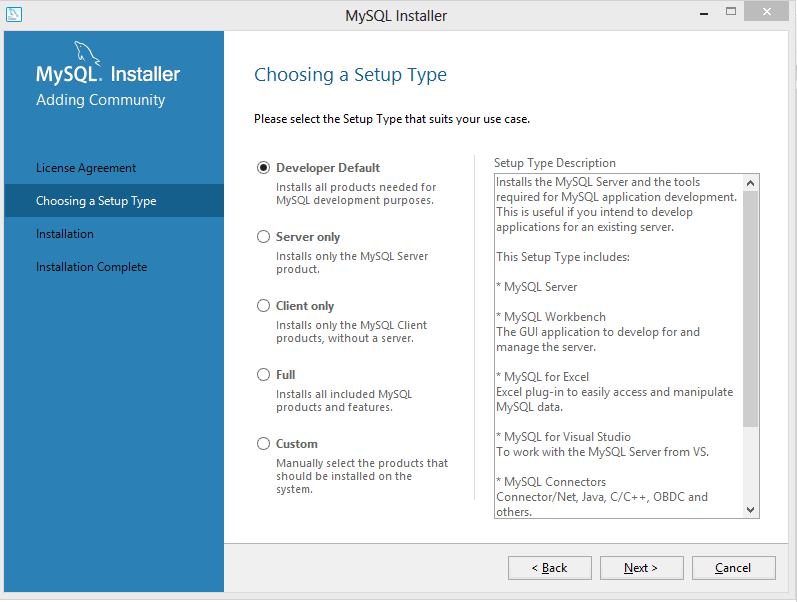
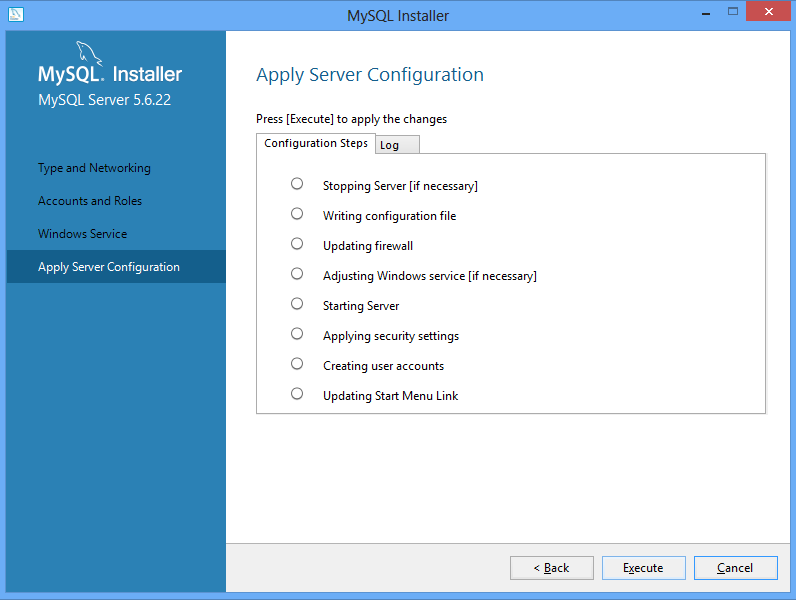
If you want to go the quick and dirty way, go ahead and choose the Developer Default option. It will install everything you need, and probably some stuff you don’t. You might want that stuff later on, but for the sake of this article, I’m going to choose the Custom option and pick what I want installed. You should install the Server and Workbench at minimum, though it’s a good idea to include the notifier and the documentation as well. You’ll have to click through some category trees to get what you want. Use the green arrow to add your options to the list of things to be installed.
The installer will check to make sure you have all the required utilities to do what you want. In my case, I didn’t have the C++ 2013 distribution on my machine — you may have more things that need installing. Just click Execute and the necessary files will be downloaded and the respective installers will run. Once everything is installed, click Next and your MySQL install will begin.
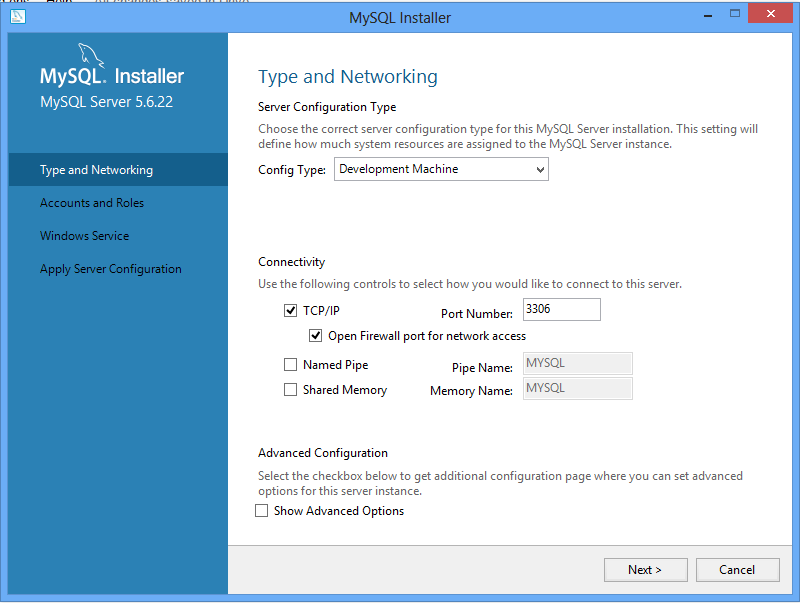
For configuration purposes, go ahead and keep the defaults, unless you have specific reasons not to (and you know what you’re doing).
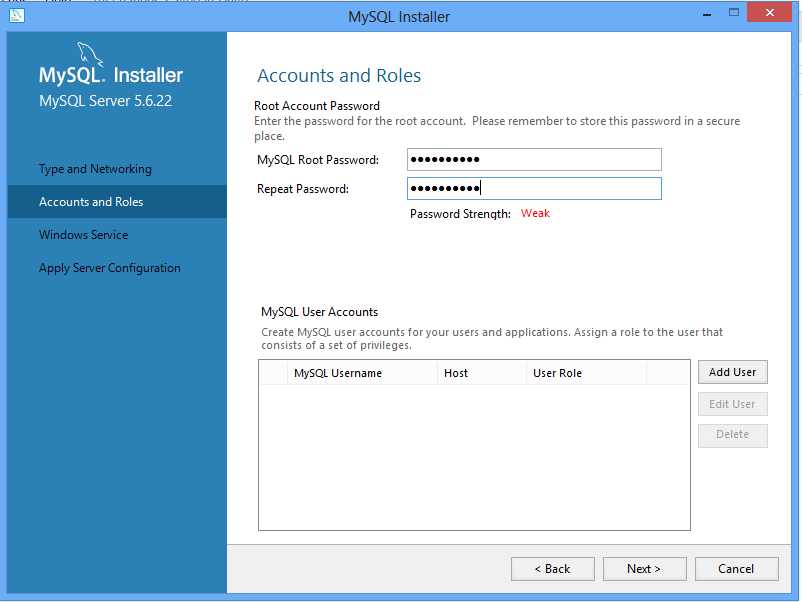
You can add users to the database if you want, but for simplicity, we’re just going to define a password for the “root” user. REMEMBER THIS PASSWORD. It’s your key to doing anything with the database — adding data, querying, etc. If you lose it, you’re pretty much horked. Use a familiar password or write it down. If you’re just having this on your own machine, there’s really no need for a super-complicated password. It’s holding freely-available data, after all.
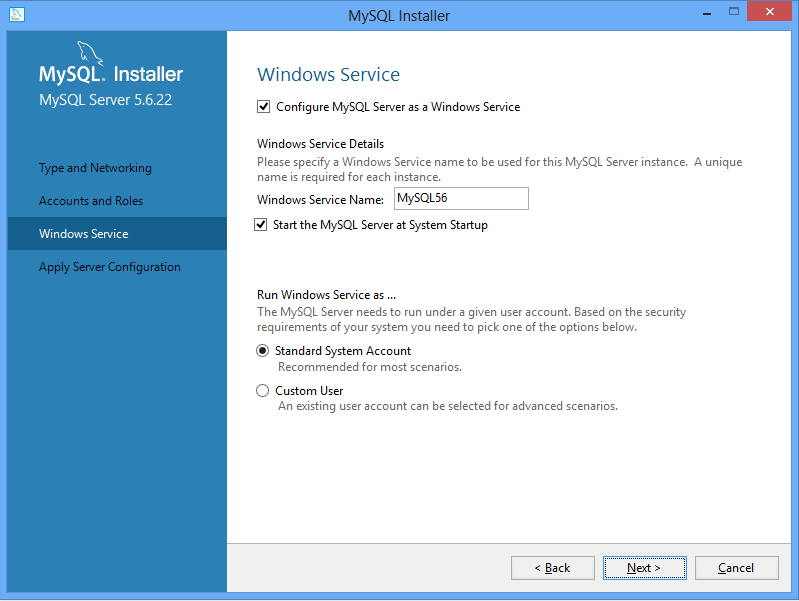
For the Windows Service configuration, you can keep the defaults as well. You can choose to not have the MySQL service to run when you start the machine, but if you do you’ll have to manually start the service each time you want to use the database. If you don’t know what that means, have it run on default.
Go ahead and click Execute, and the options will be configured. After that, a few clicks of Next should do it. You’ve just installed MySQL on your machine. Congratulations!
Step 2: Install Wget
Wget is a great utility for downloading mass amounts of data from a server without having to click a thousand links. It’s a script-based tool, and it’s what you’ll need to download all the Retrosheet data with in one big swoop. Don’t worry, we’ll provide the scripts you’ll need.
Download the installer here. Run the installer, keeping all the defaults.
Step 3: Install 7-Zip
7-Zip is a .zip file utility. It’s one of the best free tools for handling .zip files, and it’s what we’ll be using. You can download the installers here. Choose one of the first two options, taking care to choose the right version in regards to 32- or 64-bit. If you don’t know what version you have, go to the Control Panel of your machine, click System and Security, then System. You’ll get a similar screen, which should show you your version. Remember which one you have, as this will be important later on.
Yes, I name all of my devices after baseball players. Don’t judge.
After you’ve downloaded the right version, go ahead and install, using all the defaults.
You’ve done it! You’ve done all the pre-steps for installing your Retrosheet database. If you have any questions, sound off in the comments. Stay tuned, as next week, we’ll get our hands dirty with installing the actual Retrosheet data. I’ve made it as painless as possible, I promise. Don’t get worried. If you can handle what we did today, you can handle the rest. Good luck, and don’t feel bad about asking for help.
Word is the Google Cardboard toy — which started as a gimmick, is now a toy, and will soon be a tool, I suspect — now has over 500,000 users.
This got me thinking: We already have mini-cameras we can embed in the ground; we have 360° camera technology; and now we have cheap, accessible virtual reality (VR).
Isn’t it time for 360° MLB.tv? Perhaps a camera embedded neatly in front of home plate or the pitcher’s mound. Maybe on the back of the mound to watch closeup up as the shortstop flips a double-play ball to the second baseman.
Google Cardboard could rapidly democratize the world of VR customers.
Or what about mounting a 3D camera on the cable-tugged NFL sky view cameras? Allow fans to watch the play unfold while focusing on just their fantasy wide receiver, finally giving them the vindication to scream at the quarterback, “He’s wide open! Throw it to James Jones already!”
And doesn’t NASCAR already have cameras mounted on every vehicle? Would it be any more difficult to swap in a 360 model?
The technology is probably not a point just yet where a 360 camera can be safely embedded into a soccer pitch or — certainly not — a basketball court or hockey rink. But goal post cross bars, tops of basketball backboards and jumbotrons dangling from stadium roofs could all be reasonable and fun locations for VR watchers.
Think about it, sports execs. Because it would be awesome.
It was always the big paradox. Whenever a new rendition of a sports game came out you had two choices: upgrade and get all the new graphics and features, or stay the course with your current version and continue to build on the sports empire you had created. Well, luckily, MLB 15 The Show is making it so you don’t have to make such harrowing choices. Finally, FINALLY, you will be able to carry over your progress from the previous version of the game to the next.
According to both the official trailer and the list of new features over at GamesStop, if you have given your blood and sweat to crafting an unbeatable juggernaut team or your perfect Steve Nebraska-type player on MLB 14, you can take that progress with you if you procure MLB 15. It’s not 100% clear how the Franchise or Road to the Show game saves will be transferred — I suspect an Internet connection will need to be involved — but the mere fact that it’s being mentioned should cause fans of the game great relief.
This feature would be welcome in any sports game, but even more so in a baseball offering. The seasons are so long and the process to get created players to the majors is so exhaustive that it always brought me a tinge of heartache to leave a game behind for a shiny new one. The prospect of trying all over again always brought some excitement, but I found myself wondering whatever happened to the lefty knuckleballer I made or the unstoppable Mets team I curated just a few years back. This new feature will be celebrated a great deal in my living room, certainly.
You can check out the other new features — including some sort of radio show implementation — at the GameStop link above. The game is set to be released (friendly reminder: PlayStation systems only) on March 31st.
Robinson Cano has had a big year. He signed a very hefty free agent contract, became a charter client for one of the most talked-about sports agencies, and still managed to be the best-hitting second baseman in the league. Now, to help cement himself as a superstar in sports, he’s signed a partnership with a tech company.
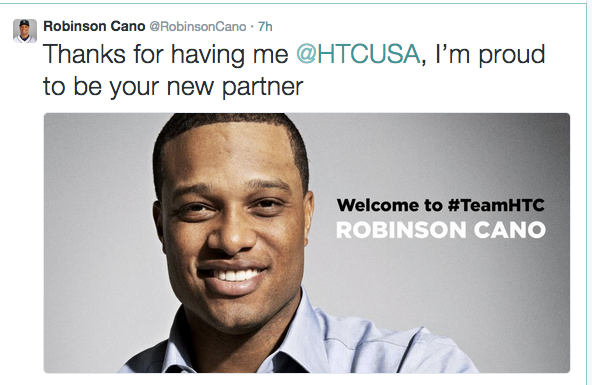
Taiwanese gadget maker HTC has announced a partnership with Cano via a press release. Cano and his smiling face confirmed as much on Twitter:
HTC, a maker of Android and Windows devices, is hoping to break into the sports world much like their competitor Samsung has (though not without some controversy). HTC had previously launched a fairly forgettable campaign with America’s Boyfriend Robert Downey, Jr. to little fanfare. Perhaps their new partnership will help bring their (very well-made, in my opinion) devices to the American mainstream via America’s pastime.
If you’re jonesing for some baseball — and who isn’t? — then fear not sports citizen, as there will be live professional baseball being played tonight! Technically it will air at 4 am E.T., so it is tomorrow morning, but the point remains. Major League Baseball kicks off the Japan exhibition games with the opening match set for tonight.
The game will consist of MLB All-Stars going against a collection of players from the Hanshin Tigers and Yomiuri Giants. Following that game, a five-game series pitting the MLB All-Stars against the Japanese national team, Samurai Japan, will begin and the tour will close with a final exhibition game. Rather than squaring off against the Japanese All-Stars again, the MLB players will be thrown up against the national team due to the Nippon Professional Baseball commissioner wanting the national club to gain experience heading into the 2017 World Baseball Classic.
Current MLB.TV subscribers will have access to all of the games or one can pay the 24.99 for the off-season package which includes every regular season and playoff game as well. With the off-season package also including over 200 spring training games, if you haven’t subscribed yet, you ought to. If you’re unable to catch the middle-of-the-night games or don’t want to pay extra to view the online stream, MLB Network will re-air the games at 9 pm E.T. the same day.
An interesting note is while the game will be broadcasted on television in Japan, current MLB.TV subscribers in Japan will not deal with any blackout restrictions. There has never been a blackout policy for countries other than the United States and Canada, however given the probable high television ratings these games could bring, it is curious — yet encouraging — to see the league take a more passive stance on blackouts.
Boston Red Sox manager John Farrell and 29 All-Stars will look to repeat the perfect record MLB had in 2006, the only other time a five-game series was played between the two leagues as well as the most recent. Three of those five games were decided by two runs or less and hopefully the games this year will be just as exciting.
As recently as October, we mused about the possibilities of augmented reality in sports, and I concluded with a brief story about some strange display technology my grandfather encountered in the 1960s — a device that could purportedly display 3D images without 3D goggles. I have always had trouble conceptualizing that idea. How to you make light stop mid air? How can you create a hologram without some sort mist or substance to reflect the light in transit? Well, I dunno. Maybe it’s not possible.
And maybe this:
This technology could be significant in many ways. It could illuminate the ball path for a touchdown throw, a three-pointer or a fastball on the outside edge for fans in the stadium (not to mention umpires and referees). It could show a glowing yellow line for the first down marker that more than just the audience at home could see. It could change the role of a scoreboard as we know it.
A butterfly image flits above a street in Japan — and everyone can see it.
Obviously, glittering dots in the sky are a long way away from an illuminated pitch tracker. But computers went from singing Daisy to World is Mine, this, in under 60 years. We cannot say where this current technology can and will end.
Purchasing tickets online is nothing new, but Gametime has made the process even easier when buying from your mobile — Android or iOS only — device. The company has just update their free mobile app and now rather than refreshing a page again and again, the app now has a “pull to refresh” email style option. It’s a small change that goes a long way in terms of convenience.
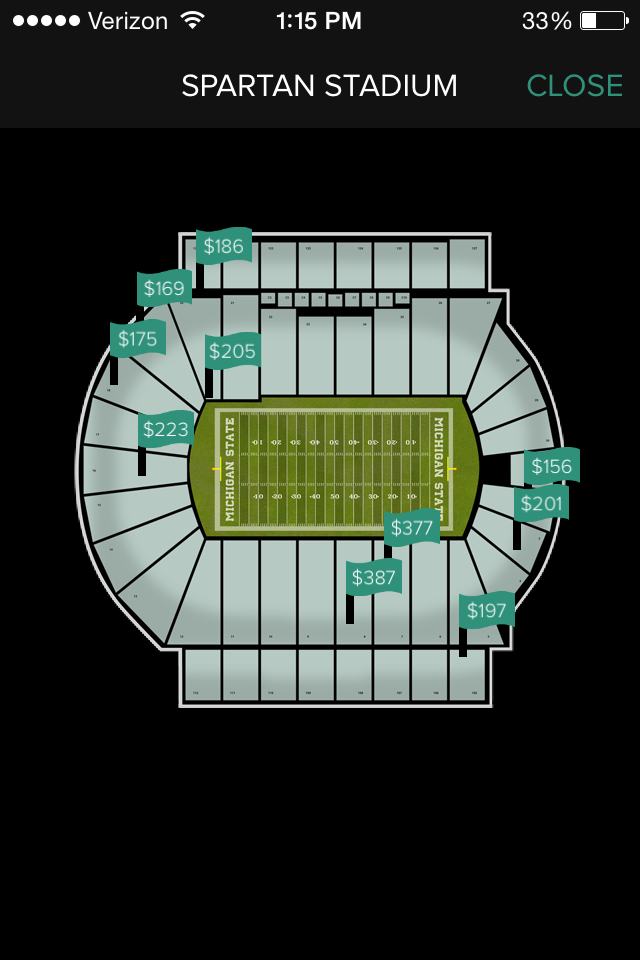
Not only is it easier to search for tickets with the pull to refresh option, Gametime now shows exactly where you’ll be sitting. With a birds eye view of the stadium or a field view, you know if you’ll be up in the nosebleeds or right on the sideline.
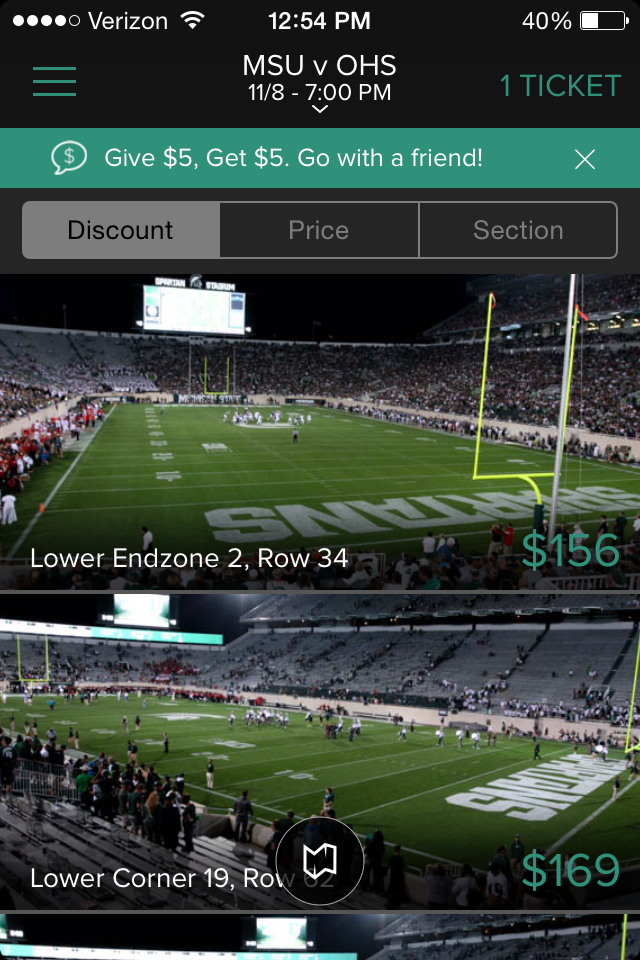
The field view gives the section, row and seat while showing what the field/court/rink will look like from the seats you’re interested in.
The app allows purchasing up to 20 tickets per transaction and is within one second of real time availability. In an interview with VentureBeat, Chief Executive of Gametime Brad Griffith said of the updated ticket availability:
“We shifted to a video game style technology that can be immediately updated…It’s like playing a video game with another player. You have to keep it synchronized or it’s not a good experience.
Gametime currently works in 22 different cities and 60 venues. With app you can purchase tickets to NFL, MLB, NCAAF, MLS, NBA and NHL games. One downside is you’ll need a credit/debit card on file, as neither Paypal nor Venmo is currently a pay option.
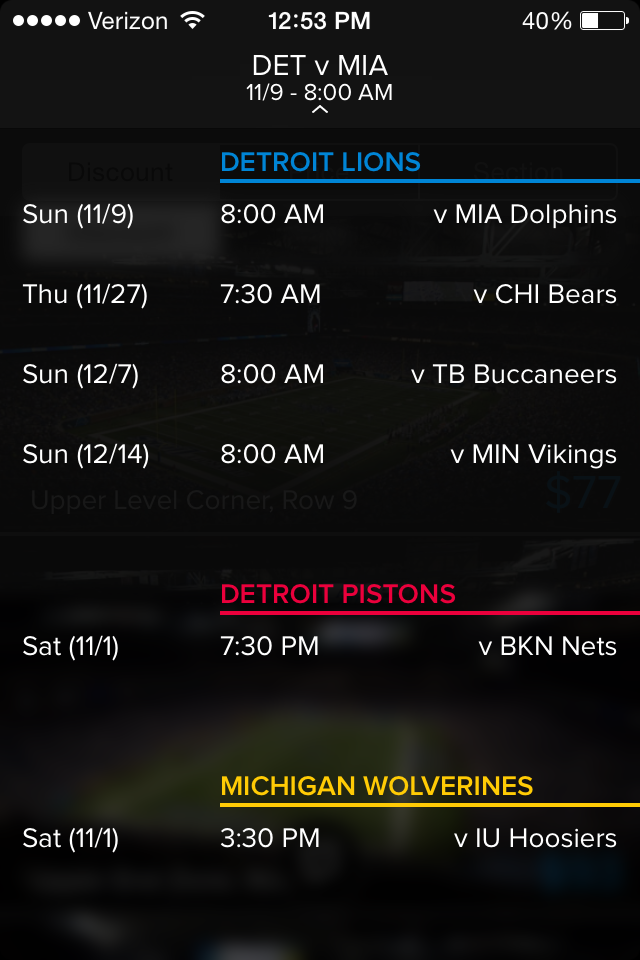
Another curious quirk was the start times of certain games is wrong. After selecting Detroit as my city, it showed the Lions are playing at 8 am on Sunday, November 9. The game actually kicks off at 1 pm.
Gametime did get the University of Michigan game and the Pistons start time correct, but they were an hour early on the Michigan State game. There wasn’t a way to change your timezone, so make sure to cross check the actual game times with what is listed. After checking more Lions games, it appears as though each game time for the Detroit football team is wrong.
If you happen to find any other unusual goings on, reporting them to Gametime is as easy as shooting an email to their feedback email address or one could call or text them from 8am-11pm Pacific at their 1-800 number. Both help options are listed on their website FAQ, not in-app however.
Overall the app does exactly what it should: purchasing tickets from mobile quickly and easily, usually without having to print them off. A small number of venues still require a paper PDF ticket but that is outside of Gametime’s control. It can certainly be a useful app for everything from a last-minute decision to go to a game or if you just need an extra ticket while on the way to the stadium.
We here at TechGraphs are big fans of Out of the Park Baseball (OOTP), and you should be too. It’s an immensely deep and feature-rich baseball simulator that allows you to create your own dream team using past or present players. Do to its extreme customizability, it also makes for some great thought experiments.
Recently, the New York Mets announced that they would, once again, be moving in the outfield fences in the right-center portion of Citi Field to make the park a little more hitter friendly. This will be the second time since 2012 the outfield fences have been tweaked with. The news lead to a myriad of jokes on Twitter, including this:
Queens, 2035: CitiField's dimensions are now 150 feet in all directions. Mets are out-homered, 1,215-1,049, and go 79-83
Which led to the fine folks at OOTP actually testing this theory out. Over on the OOTP blog, Brad Cook outlines just how he went about simulating a 2015 Mets season with a home park that was the Bandbox to Rule Them All.
Cook actually uses two methodologies, one with a straight 150-foot fence, and one with a slightly more realistically curved one. Click the link for the full details, but be prepared for Ike Davis to win the Triple Crown (and still be less valuable than Mike Trout). Needless to say, the Mets score a lot of runs and give up a lot of runs. But in one scenario, they actually manage to be a pretty decent team (there’s hope, Mets fans!)
OOTP is a wonderful game to play the “normal” way, but it’s tricks and tweaks like these that make it all the more enjoyable. On a similar note, friend of the site Patrick Dubuque performed a similar-ish experiment, creating four teams consisting of nothing but Adam Dunns, Koji Ueharas, Dee Gordons, and Bartolo Colons. This type of thing slices through the meaty side of life, and when the winter doldrums hit my abode, you can be sure that I’ll be experimenting like this until Spring Training starts.
We are already accustomed to seeing unreal sights in our sports. But what about seeing tracers for free throws and drive charts on the gridiron when we are at the stadium?
When the yellow line appears on the first down line, we don’t hide behind our couches in caveman fear, nor do we dive under the bed when car names and driver photos appear above the machines zipping around the Daytona Speedway. And baseball fans have embraced the new MLB Statcast, which debuted during the 2014 MLB All-Star break and has shined in the 2014 MLB postseason. It essentially quantifies every movement on a baseball field and then visualizes the data for viewers at home: