Archive for Baseball

A List of Grievances for MLB.tv and MLB At Bat

I pay anywhere from $100 to $150 every season for the ability to watch every Cubs and Rays game I can. In the olden days, I would have paid a cable company for that service. But I’m as up-to-date as Kansas City, so I haven’t paid for cable, actually, ever in my life.

I love both of these things: MLB.tv and the MLB At Bat app for my Nexus 5. The former allowed me to watch my precious Devil Rays get whollapped while I was an intern in Hong Kong back in 2007. I’d wake up every morning, take the thirty minute bus ride to work, finish my day’s worth of work in 15 minutes, and then watch the previous night’s Devil Rays (which, at 9:30 in the morning had just finished) on my Dell Inspiron laptop (peace be upon it).

Since then, MLB At Bat has allowed me to watch Cubs games on the bus or in a car trip (given I have enough signal). I watch until I get carsick, and then I watch a few more minutes. At Bat also lets me listen to games at work. No, curious officemates, I’m not actually listening to Hall and Oates as you suspect, but actually Vin Scully. Put that biz on repeat.

But there are some problems. Some fixable problems. And some questions. As a loyal, paying customer, I demand answers.

  1. End the Blackouts. This one is obvious. Everyone hates the blackouts. They were designed back when stadiums were all built out of wood and the television was this snazzy and expensive device that was going to destroy radio and real life forever. Now that we’re blaming smart phones for destroying the television and real life forever, maybe we can lighten these blackout rules?
  2. End the Radio Delay. This one is less obvious, but equally outside of the purview of the people who run the actual coding behind MLB.tv and MLB At Bat. Still, it’s dumb as all get out and primed for the garbage heap. Sometimes, I am forced to listen to, say, an ESPN broadcast or the White Sox play-by-play team because the Rays aren’t broadcasting the game. Instead of muting my TV and listening to the fine commentary from WDAE, I have to listen to what amounts to a chlorine gas for my brain. It becomes very difficult to watch the game when I have to scream into my pillow after every Hawk Harrelson comment.
  3. AT BAT NEEDS A FAST FORWARD BUTTON. I am watching a Cubs game from last night. The Len Kasper gives a great intro, talks about the previous game, and then send it to commercial. Then my precious little phone has to stream five minutes of “COMMERCIAL BREAK IN PROGRESS”. How many hours have I wasted watching those shadows shift and move along that metallic backdrop? A “Back 30 Seconds” button is the easiest, most obvious feature for a mobile video streamer. Netflix has it. Hulu has it. And MLB.tv used to have it. And unlike Netflix or Hulu, MLB.tv has long empty spaces, so it needs a “Forward 30 Seconds” button too. Yeah, the condensed games are nice, but I want to hear Len’s insights; I want to see the graphics and get the reports on the opposing teams; I want to experience the whole game — preferably without the battery-draining wastelands that are the whitewashed commercial breaks.
  4. Well, at least this time the loading screen is showing the probable starters!
    Well, at least this time the loading screen is showing the probable starters!
  5. Is MLB At Bat opening really slowly for anyone else? In the latest update, I find myself sitting in front of the little spinning loading icon for at least five minutes every time I open the app. I never had this issue with previous versions. If a game has just started, this can prove very frustrating. All I want is the PITCHf/x report on that last pitch. Please just finish loading!
  6. Why is Classic Gameday still the only way to look at previous at bats? I am thankful the developers have left Classic Gameday available to those of who care about history or posterity or what happened five seconds ago, but it would be nice if MLB At Bat or the newest in-browser Gameday actually had that basic, essential feature of the old Gameday. How am I supposed to tweet about the ridiculous Sam Fuld triple if the zone is already showing the next hitter?
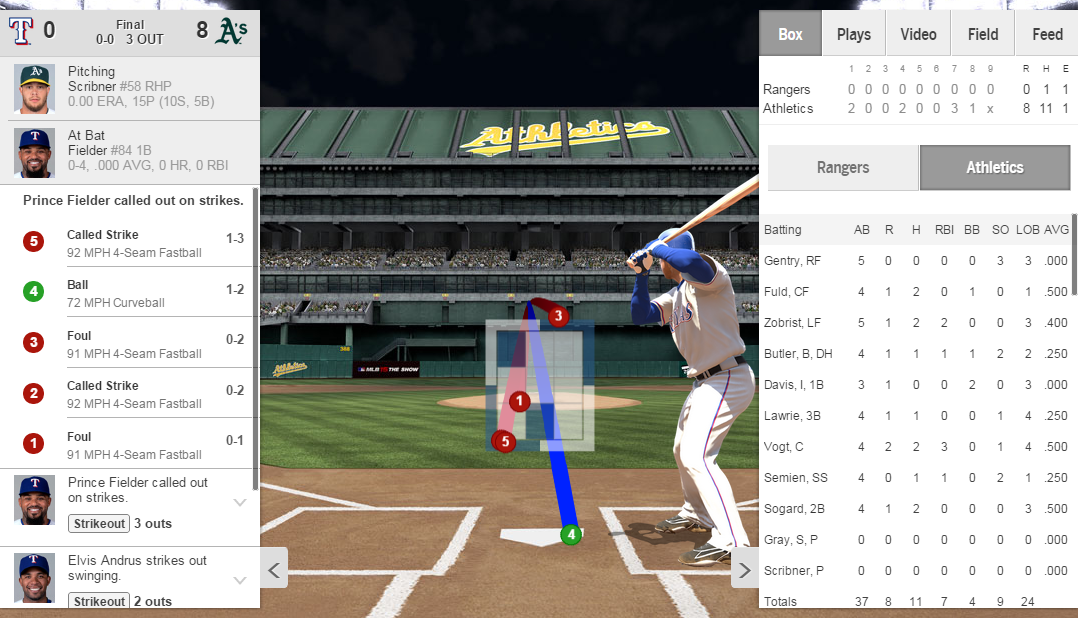
  7. Want to see that first inning Sam Fuld triple? Too bad. Instead, feast your eyes on this, the final -- and very meaningless -- at bat of the game!
    Want to see that first inning Sam Fuld triple? Too bad. Instead, feast your eyes on this, the final — and very meaningless — at bat of the game!
  8. Random Disconnections. I know others have to be suffering from this. I have had this problem for about five years, spanning two states, three cities, eight different residences, and at least four different internet service providers. (I honestly don’t remember it happening in China, so go figure.) I’m watching a replay of a game on MLB.tv, and then everything freezes. I have to quickly look at the progress bar and memorize my place in it because I know what’s about to happen: The game is about to start over at the beginning. It’s like as soon as my bandwidth gets choppy, MLB.tv pisses its pants and forgets its middle name. I think the problem correlates with MLB NexDef (I don’t remember having this problem before NexDef, even they’re even still using it) and iffy internet speed, but since I stream Netflix, Hulu, HBO Go and Amazon Prime without the shadow of a problem, I have to believe something at MLB.tv is just playing stupid.
  9. Oh, there's the Fuld triple -- squirrelled away in the Gameday designed during the Bush administration!
    Oh, there’s the Fuld triple — squirrelled away in the Gameday designed during the Bush administration!
  10. DON’T SHOW ME THE SCOR– too late :(. Ah, the tedious, beautiful art of opening MLB.tv and not seeing the score of the replay you’re about to watch. I’ve tried squinting until my vision was too blurry to detect anything but shapes and colors. I’ve tried covering part of the screen with my hand and carefully navigating to the replays, sometimes by muscle memory alone. I’ve even asked others to start the replay for me so that I don’t have to risk seeing even a headline related to the game. This is no longer an issue with MLB.tv. This is specifically an At Bat problem. Do I have to make the Miami Marlins my favorite team just to be sure I won’t see any meaningful scores?! Why can’t I set my landing page to a score-free mode or a day-delayed mode? Or, better yet, just make my landing page the video feed selection. I can then navigate back to my team’s news feed if I’m still operating in normal earth time.
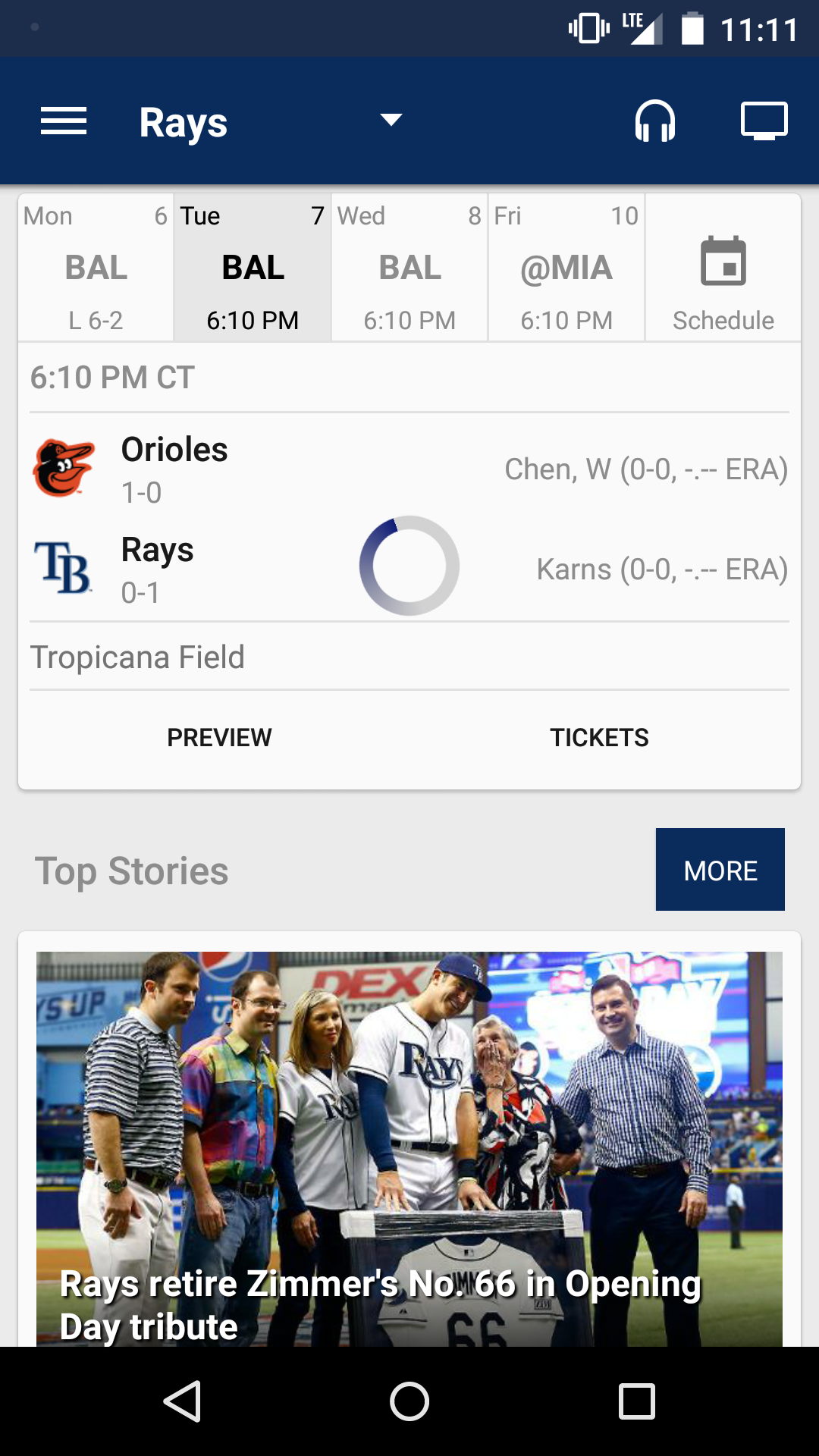
This is all very whiny. And it’s pretty much a shimmering monument to First World Problems, but these are issues real enough to me. Partly because I write about baseball, and therefore have to consume a lot of baseball, and therefore use MLB.tv and MLB At Bat daily. But it’s partly because I’m a fan. So I’m hoping others out there will agree with me.

All told, I love MLB.tv and At Bat. They bring baseball into the 21st century and have enabled my fandom, starting way back in 2007 when I was just a punk college kid sad about leaving behind his 10-inch dorm room TV. And I fully expect MLB will continue to improve these products. But a little complaining here and there can sometimes help.


3DPlusMe Will 3D-Print You as a Baseball Player

The above image is a mock-up of what I would look like as a member of the Houston Astros. It comes courtesy of the folks at 3DPlusMe, a Utah-based company that specializes in converting facial scans to 3D-printed models. 3DPlusMe had a booth in Salt River Flats during Spring Training this year, and my boss David Appelman pointed it out while we were attending a game during our yearly FanGraphs trip to Arizona.

3dplusmebooth
Photo courtesy of 3DPlusMe

The booth was a fairly simple setup. On one side, there was a tablet PC that allowed the representative to help a user customize their creation. The other side featured a chair positioned in front of a camera and a customized Microsoft Kinect setup. I sat in the chair and stared a small video screen (to promote zero head movement), the Kinect moved 180 degrees from my left ear to my right to scan my handsome features. The total time from scan to conversion was fairly short, and I was customizing my player in a matter of minutes.

You may have seen 3DPlusMe in the news before, as they offer a similar product featuring Marvel, Lord of the Rings, and Harry Potter characters. They received some press at last year’s ComicCon.

Once the scan is done, the customer can pick their favorite team and see their likeness dressed in full team garb. They are then given as special code to use on 3DPlusMe’s web site to order a figure of themselves.

DavidTemple

Yes, I am actually this muscular.

Cydni Tetro, CEO of 3DPlusMe, said that they have licenses with both MLS and MLB, and debuted their MLB booth at the All-Star Game last year in Minneapolis. They also had a presence at the World Series in San Francisco and Kansas City. Tetro did say that there are plans to be in more parks in 2015, though she couldn’t comment on anything definite when we spoke.

Beside ballparks, 3DPlusMe booths can be found in select Walmart stores, as well as FAO Schwartz and the Times Square Toys ‘R Us in New York. Tetro told me that while focus was geared toward fantasy/sci-fi products in the past, 2015 will be the year a big push is made in the sports market.

While I haven’t seen an actual model, the renderings look pretty dang accurate. Teams should think about using 3DPlusMe for their bobblehead giveaways, and save us the emotional scarring of what is offered now.

Would I buy one of these things? Of course not. But these products are most certainly geared toward children, not cynical 30-somethings. Also, a 3D-printed version of myself as Iron Man would be my wife’s first and only entry into evidence during our divorce proceedings.

3D printing is still a relatively new technology, at least as far as the consumer-grade segment goes. 3DPlusMe hasn’t even been in business three years yet, and they’re already making waves in the sports and entertainment industry. I’m sure personalized doppelgangers are just the first step. I won’t get a 3D model of myself as an Astro, but if 3DPlusMe or one of their competitors got in the miniature ballpark printing game, I might just cut them a blank check.


My MLB Second Screening Apps of Choice

To celebrate the return of baseball, all this week TechGraph writers will be highlighting their favorite apps, tools, tricks, and more related to our national pastime.

I feel as though I’ve reached the critical mass of baseball fandom. Watching a game on TV — or more accurately via my computer and casted to my TV — isn’t enough anymore. I fully recognized I’m in the minority of what I want out of a baseball broadcast, which is about the nicest way of saying I like the nerd statistics. The perpetually running hamster wheel that is my brain tends to require additional numbers and context when a broadcaster may casually mention what a hot start a player is off to. Or maybe something so extraordinary occurs that a GIF, picture or video must be captured. Thus, here is a list of the apps I find myself turning to when I feel the need to second screen while watching a game.

MLB.com At Bat
Let’s get the obvious one out of the way here. Why watch one game when you can watch four on one screen? Or, watch one game on TV, another on the laptop, with your tablet also running. To be fair, I’ve only been guilty of the triple screen a handful of times.

Twitter
Ain’t no party like a Twitter baseball party! From #WeirdBaseball to #HotTakes, the things baseball people are capable of making catch on is impressive. Sharing the good times and bad across thousands of miles add another level to the baseball viewing experience. I’d be hard pressed to find an app I use more frequently than Twitter while watching a game.

GifBoom
For those moments that have to be immortalized on the interwebs via GIF, GIFBoom, in my opinion, should be the go-to option for Android users. Since switching back to Android — and thus losing my beloved Echograph — GifBoom is a more than adequate replacement. Sporting a timer, a surprisingly solid zoom feature and the ability to convert existing video to GIF form, all for free, there isn’t much to disagree with.

Chromecast
Without this little HDMI dongle, my second screening would be a lot tougher. By pushing my MLB.TV to the television, I can use my laptop (or phone or tablet) for any number of other things. While Chromecast does say it requires a universal plug-n-play router, you can get around that fairly easily.

Google Docs and Sheets
Me, a baseball nerd utilizes a ton of spreadsheets? Shocking, I know. I keep a table of starting pitchers, relief pitchers and position players. Add in historic top-50s and single season records, if I’m ever stranded in the middle of nowhere and my battery isn’t dead, I can find out who holds the single season record for HBP, I can. For what it’s worth, the answer is Hughie Jennings in 1896 with 51 times being plunked. On the documents side of things, I tend to make notes as the game progresses. Rather than maintain a traditional score book — or app equivalent — I use Docs to jot down in-game events I find interesting.

Shazam
I love walk-up music for hitters and entrance music for closers. The whole thing is so campy I can’t help but love it. Unfortunately, sometimes it’s tough to tell exactly which song is being played and thus, enter Shazam! It isn’t always perfect, but does the job well enough for me to keep it on my phone.


MLB.TV Offering Two-Day Free Trial

Major League Baseball’s MLB.TV is the longest running streaming sports platform of its kind. The mobile version, MLB At-Bat has been tasked with keeping up with new versions of Windows, Macs, and most types of mobile operating systems (sorry Windows Mobile users). It is no easy feat and MLB Advanced Media deserves some recognition. The streaming service has had its flaws, but MLBAM just sent out an update to their apps, including compatibility with the upcoming Apple Watch. Released yesterday, MLBAM was gracious enough to give a free two day trial on the Android, Fire OS, iPad, iPhone and iPod Touch platforms. No signup or auto-renewing fee, just a simple choice of which game(s) you’d like to watch.

The features new to this year’s version are things such as pre-game lineup notifications — strictly on the iPhone for now though — which is great for daily fantasy players, as well as a much needed revamp of the Android and Fire widgets. The full list of updates and additions can be found directly on the MLB website, however another feature worth highlighting is for 7-inch Android or Fire tablet owners being able to feature your favorite team. By selecting a specific club the app will showcase scores, news and video. If any of you are fans of multiple teams, the condensed game option is also available during the trial so you can catch up on each game’s signature events.

For those on the fence about purchasing MLB.TV for the first time — or even renewing it as last season there were major bugs early on — this is the perfect opportunity to preview the system at no charge. Each operating system’s apps are compatible with Google’s Chromecast,  Amazon’s FireTV and Fire Stick for straight forward broadcasts from your device to the television. With 24 games to choose from and zero sign up required, watching live baseball has never been easier.

(Header image via MLB)


Baseball Reference’s Play Index is Free Through April 15

Next week the TechGraphs team is kicking off the opening week of Major League Baseball with content devoted to the grand old game. We’ll feature apps, websites and all tech that will soak you in all that is baseball. There is some interesting stuff in store, so be sure to check back with us next week.

In the meantime, here’s a little something for you to enjoy as you count down the hours until your team’s first pitch.

Baseball Reference is offering its holy grail of baseball statistics, Play Index, free through April 15. Sign up here and enter the coupon code “analytics”. An active Baseball Reference account is needed to sign up.

Play Index features five main search functions: Season Finder, Game Finder, Split Finder, Streak Finder and Event Finder. There’s also a tool that spits out a list of batter versus pitcher results. Almost anything you ever wanted to know can be found at Play Index, if you know where to look.

Need some examples of the power of Play Index? Check out @AceballStats on Twitter.

More Pedro Guerrero, please.

Baseball Reference also put together 34 searches you need to know that you can check out.

Let’s walk through a search together, you know, to get acquainted. Before I read the comments on the free trial page, I never knew I wanted to know the career leader in walk-off home runs. But now I’m obsessed. Commenter Richard Chester responded to the original inquiry from the comments with steps to reach the results.

  1. Go to Event Finder -> Batting by Team.
  2. The Search Form will have 2014 in the drop down, All Teams and Home Runs. Click on Get Report.
  3. Here are some fun results. But this is only 2014 and home runs in general. Let’s specify this further. Click walk-off, which is in the middle, above the results. In the Search Form in the upper left, change the year to 1938, click the to? button and set the range up to 2014. Get the report.

As you can see, Jim Thome has the most career walk-off home runs in MLB history with 13. Frank Robinson and Mickey Mantle are right behind him with 12. Albert Pujols and David Ortiz lead active players with 11.

Roy Face, who pitched 16 seasons from 1953 to 1969 and went 18-1 in ’59 despite never starting a game, has allowed the most walk-off homers with 16.

I can litter this page with nuggets of data. Yankee Stadium has hosted the most walk-off dingers (145). May is the most common month that walk-off taters occur. And the Cleveland Indians lead all teams with 178 walk-off homers. The Los Angeles Dodgers are second with 170. Scroll down a little further on the page and every walk-off homer recorded from 1940 is chronicled, in order. Was there a walk-off in your honor on the day you were born?

Play Index subscriptions are $36 for one year.


Building a Retrosheet Database — Part 3 (The Easy/Mac Way)

I’ve worked in technology pretty much all my life, but my first job was on the support desk of a software company. It was consumer software, too, so anybody and everybody called in — professionals, novices, little kids, people who wanted to learn, people who wanted us to do their work for them, and people who didn’t understand how computer mice worked. It was challenging. But I think the hardest part was that our department didn’t have remote software. This meant that every time a person had a problem, they had to just explain it to us. We couldn’t see what was happening, so we had to trust what the person was saying was accurate. Everybody sees a computer screen differently. Very rarely did a customer see it in the same fashion I was used to seeing it.

When I published the first two parts of this Retrosheet series (Part 1 | Part 2), I did not monitor the comments well enough. I apologize for that. Some people had legitimate questions and I wasn’t there to answer them. I also learned that I was making all of you trust my explanations of things. I was making you see everything through my eyes, and some people got a little confused. This stuff happens. I’m hoping to fix that here.

I also promised a way for Mac people to have access to this, so I’m doing that as well. This article/video is for:

1. Mac (and Linux) users

2. Windows users who had trouble with the first two parts

Some caveats for Windows users looking to use this method:

1. The whole point of the first two parts was to show how the SQL files can get made using Chadwick. The idea being that you could grab the 2015 (and all subsequent season) data when that became available. The method mentioned in this article involves installing one flat file. That means that you’ll need to delete all the data and reload it for 2015 next season. I have no problem making this file for you folks, and will continue to do so as long as TechGraphs and I are around. It’s not a big deal, it’s just a different approach and I wanted to be transparent about that. Mac users basically have to do this method since the Chadwick tools aren’t available for OSX.

2. The video walks Mac users through installing and setting up a MySQL database. Your method differs, and it was explained in parts one and two linked above. I try to make it clear about when I’m dealing only with Mac users, but I wanted to give you a heads up on that.

Everyone using this method will need to download this file. Just save it to the desktop. The video will walk you through the rest.

You will also need these two lines of code. The video will tell you how to do it.

cd /usr/local/mysql/bin

./mysqladmin -u root password ‘password’

I will be monitoring the comments more closely, so let me know if you have any questions. Thanks, and good luck.


You Too Can Buy a Piece of Andrew McCutchen’s DNA

Andrew McCutchen’s dreadlocks are dead locks, people. The Pittsburgh Pirates superstar cut off his famous coils of matted hair and kicked off an online auction today to raise money for Pirate Charities. The current high bid at the time this post was published is $300. The winning bidder will also receive an autographed baseball and the ability to create an army of McCutchen clones. But Dr. Ian Malcom would probably just poo all over that brilliant idea.

There are ten available locks, which will be MLB authenticated along with the autographed ball. Funds raised by the auction and his personal charity, Cutch’s Crew, will be dispersed throughout the Pittsburgh community.

In case you wondered, Mrs. McCutchen approves.

Let’s hope someone compares McCutchen’s MLB StatCast times from 2014 and 2015 – dreads versus no dreads.

For conspiracy theorists that don’t believe he ever had real dreads in the first place, McCutchen’s got you covered.

View the auction and bid here. The minimum bidding increment is $10. Bidding will end on April 2 at 10 p.m. Eastern. Shipping rates apply and will be added to final bids, so be sure to check that out.


Check Out MLBAM’s Ridiculous Launch Schedule for 2015

MLB Advanced Media, or the biggest media company you’ve never heard of, is about to embark on a video streaming expedition the likes of which the internet has never seen, supporting five launches in the next month alone, all while providing video streaming infrastructure for CBS Sports, ESPN, and WWE.

Take a look at this list put together by TechCrunch’s Matthew Panzarino:

  • 3/18 – Sony’s PlayStation Vue
  • 3/18 – March Madness streaming for Turner
  • 3/29 – Wrestlemania
  • 4/6 – MLB Opening Day
  • 4/12 – HBO Now debut with Game of Thrones

That launch calendar would be great if it occurred in a year’s time, but MLBAM is doing it in one month. If they nail it, MLBAM will be in prime position to do what has been speculated for months — spin off into their own digital entertainment company. As our esteemed managing editor, David Temple, noted, “Through some forward thinking, some early investments, and a little bit of luck, a sports league has ended up being a giant in one of the biggest tech industries around.”

As was previously reported by TechGraphs, HBO Now is being launched with an exclusive partnership with Apple TV, which created whispers that Apple is looking to start their own over the top streaming service like Sling.

In his interview with TechCrunch, Bowman responded to a question about the possibility of MLBAM supporting Apple in these efforts by saying, “I have no idea. We’d be honored to be part of anything, really… What people forget is how long they’ve been together, and how well they’ve been running the company. I think everybody would do a lot of things to be partners with Apple, but it’s hard to imagine there’s anything technologically we could bring to Apple.”

Continuing with the Apple theme, Bowman gave an update on the At Bat app launch for the Apple Watch, saying, “We obviously built a whole interface, when it launches in April and people sync their phones, [sic] obviously, the interface is different. Every piece of hardware has to look different… Hopefully, it looks cool and neat and — the watch itself, there’s ways to dig deeper. When you move it, you might just get an update, but when you punch it a couple times, it’ll dig a little deeper.”

Right now MLB.com is 85 percent of MLBAM’s business, but obviously that number is likely to fall given all off the business they’re taking on. When asked pick a competitor for MLBAM, Bowman responed, “I think the biggest competitors that we have are inertia.”

(Image via Ming-Yen Hsu)


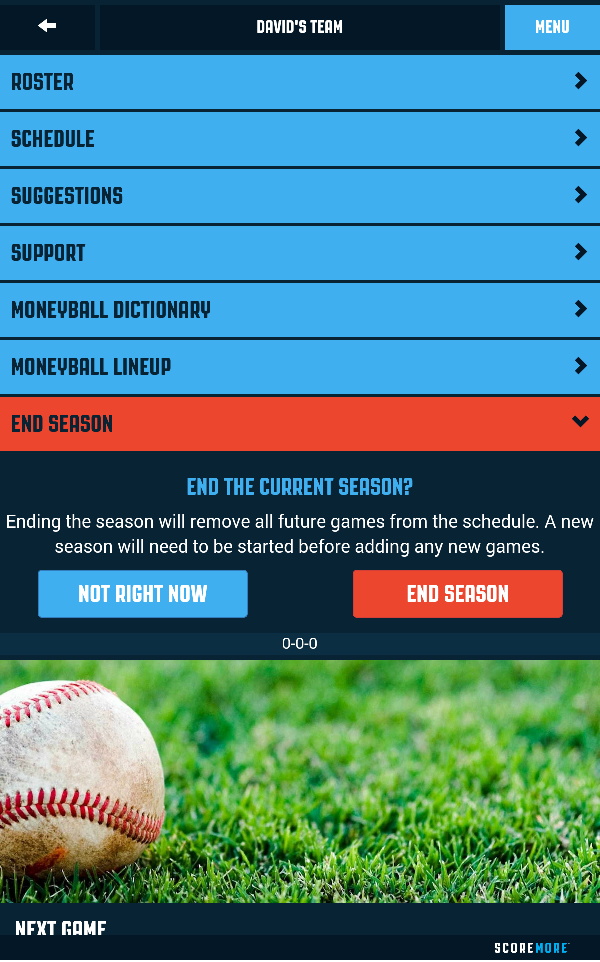
Review: ScoreMore Baseball App

ScoreMore Baseball’s main tagline is “Moneyball for all.” Grand words for a baseball scorekeeping app, but if you’re in the market to dominate the little league fields, this could be the app for you. It is available for Android, iOS and Blackberry systems and in addition to the standard hitting statistics such as batting average and on-base percentage, ScoreMore calculates Runs Created.

Unfortunately the app lacks any advanced pitching metrics, though given the necessary league numbers, statistics like FIP or SIERA are unattainable. As their tagline suggests, the phrase “Moneyball” is thrown around quite often within the app. There is a Moneyball Dictionary where terms ranging from slugging percentage to Runs Created are described — though no formulas are revealed, which is curious given that RC is a fairly straight forward one — and even a Moneyball Lineup.

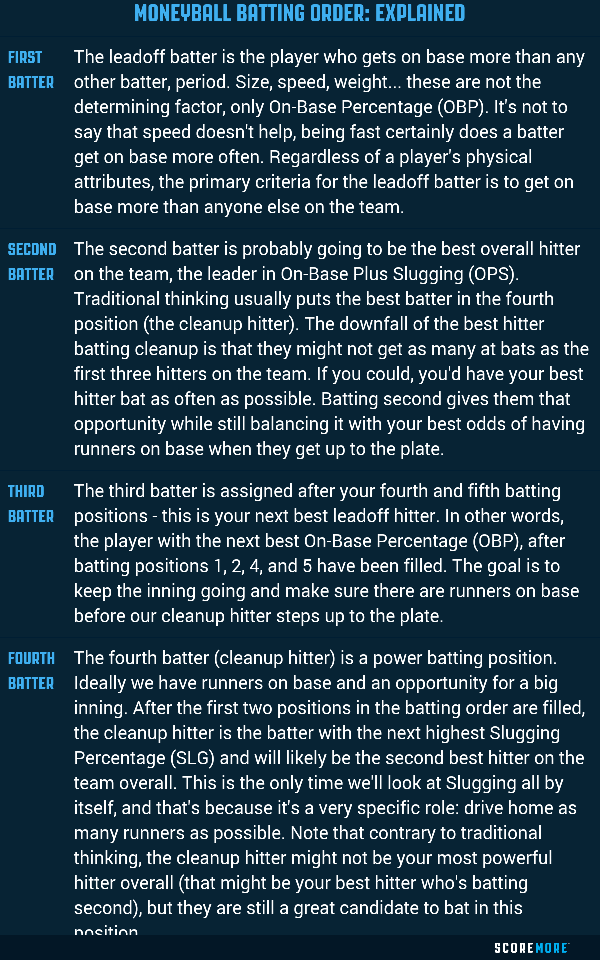
scoremoremoneyball Within the Moneyball Lineup option it describes each of the first six batting positions. Notably written under the first batter section is the sentence “Regardless of a player’s physical attributes, the primary criteria for the leadoff batter is to get on base more than anyone else on the team.” They are not “selling jeans” in the app.

scoremoreexplained

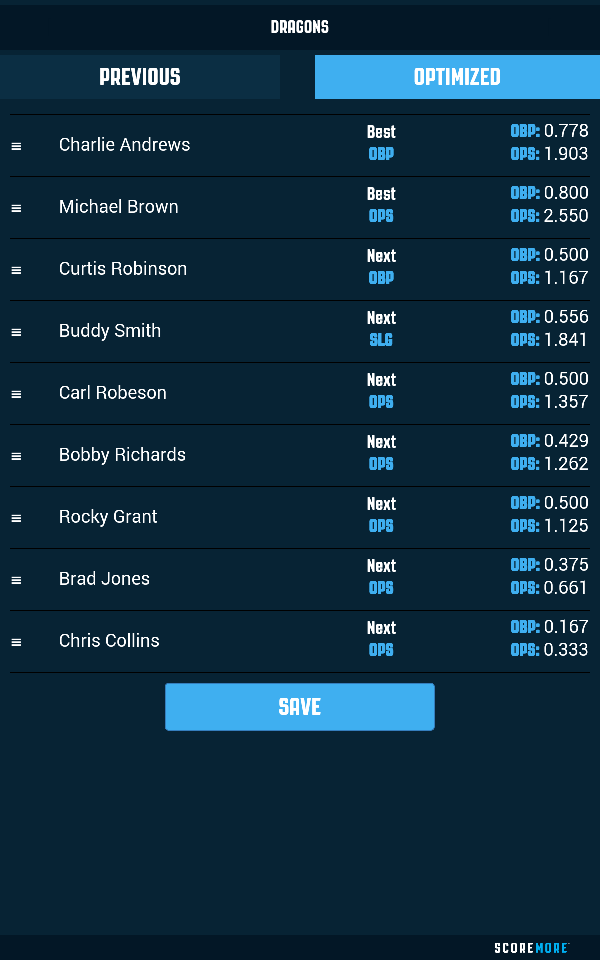
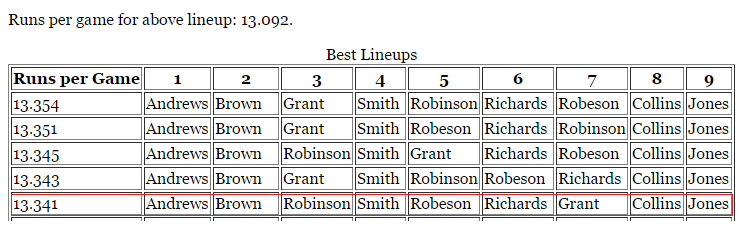
The demo shows the optimized lineup — with seven out of nine starting players OPS above 1.000 I sure like the demo offense — but let’s see how it stacks up against a different lineup optimizer, one available at Baseball Musings.

scoremorelineup
lineupopt

For a difference of .013 runs per game, the ScoreMore Moneyball lineup (outlined in red) stacks up just fine against a different one. Curious that the Baseball Musings optimizer did find find four better lineups, but rounding to the hundredths of runs is beyond splitting hairs.

A nice feature in addition to the standard score keeping is the ability to chart balls in play, though any spray chart wouldn’t be anything more than an eye-based guess. While scoring a game, you’re given the standard option of on base or out, and within the on base options there is everything else you’d expect.

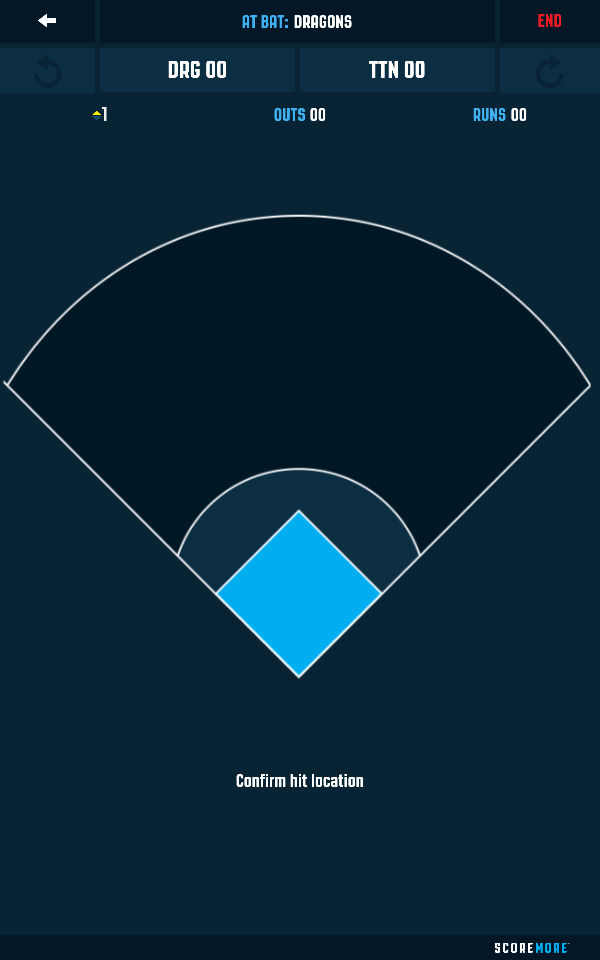
scoremorehit Say Andrews hit a double, of the line drive type, then you’re taken to a screen to confirm the hit location by tapping where the ball landed. Imprecision, the new Moneyball!

scoremorechart

For a free scorekeeping app ScoreMore does the job adequately enough. The lineup optimizer, while not perfect, is a nice feature as is the ability to chart balls-in-play, but the imprecision is something to be expected. If nothing else just charting ground balls, fly balls and line drives by color makes for a fun spray chart for people to look at, however this app shouldn’t be taken too seriously.

(Header image via ScoreMore)

OOTP Announces Sweet New Features: Managers, Owners, and More

“That video game looks like a spreadsheet,” some doubter once said to me.

“That doesn’t look fun,” another has said.

Well, those jerks can go play their laser games and their wizard sports because Out of the Park Baseball (OOTP) is just about the funnest a simulation game can be. And it looks like OOTP16 is going to be even better. Why?

Controlling owners. Manager personalities. More detailed team finance displays.

It almost sounds like satire, but I’m genuinely tickled the OOTP team announced a bevy of new complexities for their ever-impressive video game. The owners and managers are both getting more features, options, and quirks.

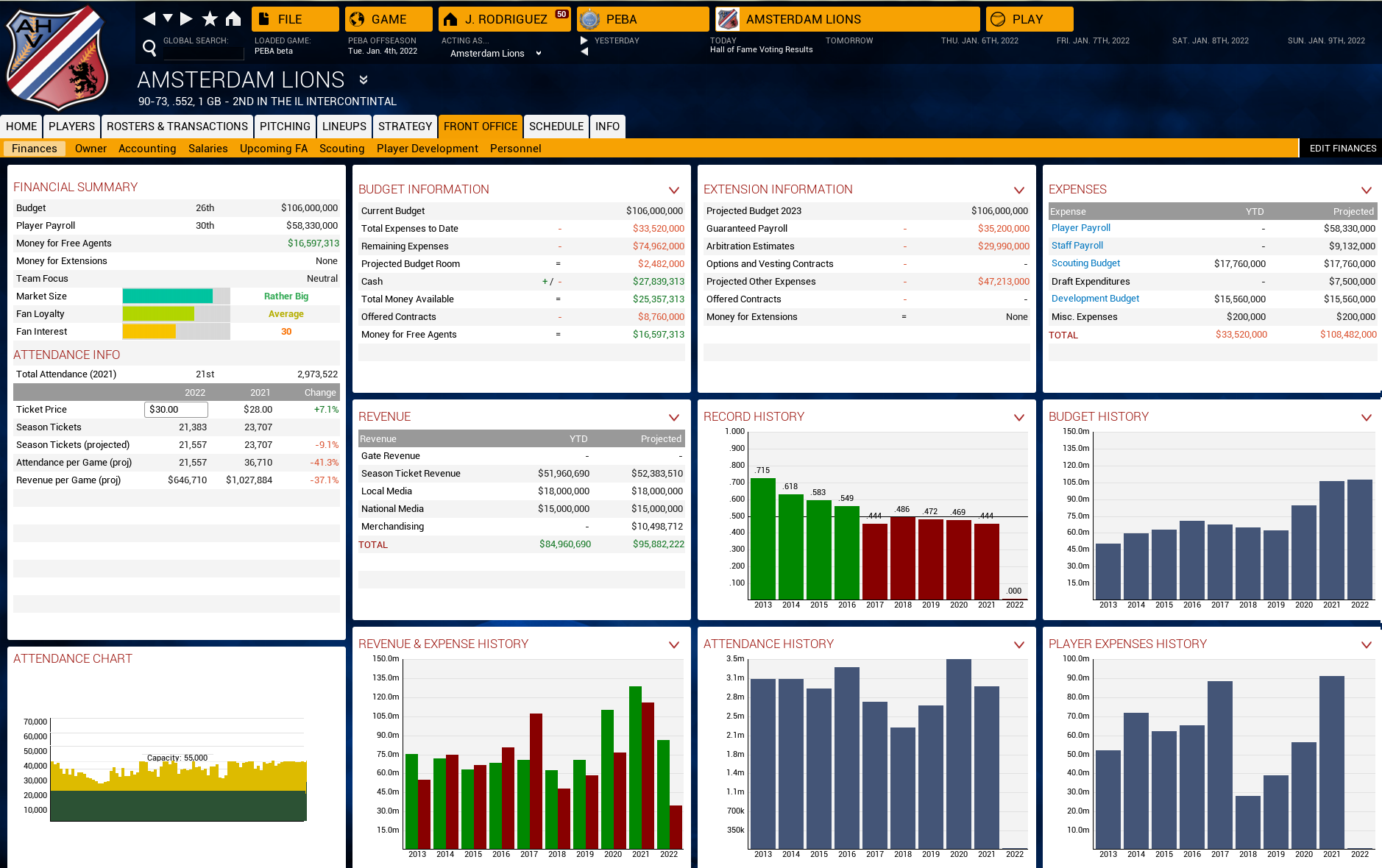
But first! A new finance screen!

A customizable team finance screen. This is the thing I always needed but didn't know I needed.
A customizable team finance screen. This is the thing I always needed but didn’t know I needed.

This is nice because it will save me some time flipping back and forth from the Team Info to the Graphs to the Advanced sections. Now I can amalgamate the greatest hits into one screen.

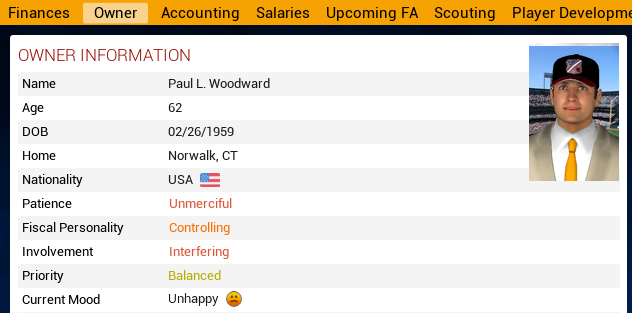
Here’s a look at the new owners:

The owners -- now with more personalities!
The owners — now with more personalities!

And they’re coming with a list of demands!

Here's a look at some of the owner issues. This particular owner, we can see, is a dumbo.
Here’s a look at some of the owner issues. This particular owner, we can see, is a dumbo. Hayashi was past his prime!

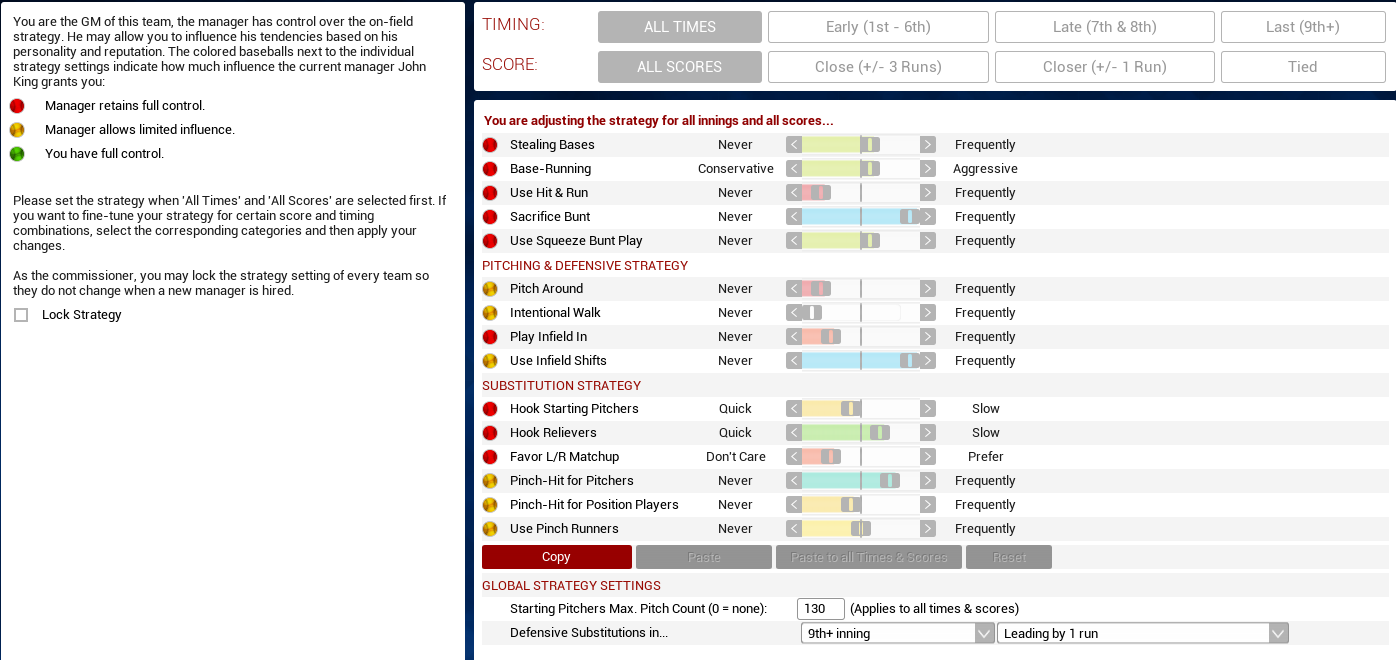
And now managers are going to have more discrete tendencies, and we can control how much they control even more!

The redone strategies page looks MUCH better --  vaguely like a thing I'll actually use now.
The redone strategies page looks MUCH better — vaguely like a thing I’ll actually use now.

I’m excited.