Archive for Baseball

Building a Retrosheet Database for the 2016 Season, Part 2

Hi, folks. Below you will find Part 2 of our video series involving building a Retrosheet database. If you haven’t, make sure to check out Part 1 before digging into this.

*The video explains this, but you’ll need to re-download the files from our GitHub page. I found a couple of small errors there. No harm done, just make sure you have the updated files before continuing. The video explains how to do this.

Enjoy! Let me know in the comments or on Twitter if you have any questions or problems.


ALERT: T-Mobile Customers Can Get MLB.tv for Free This Season

T-Mobile is still pushing hard on its “Un-carrier” campaign, and their newest venture is a huge boon to baseball fans. T-Mobile and MLB have extended their partnership another three years. This means a lot of T-Mobile branding will be seen on various MLB properties — including things like the All Star Game — but the “celebration” of the partnership brings some big-time savings.

Any T-Mobile customer on the Simple Choice plan will have the opportunity to sign up for a free year of MLB.tv. And from what I’m reading, that doesn’t really include a lot of red tape or hoops to jump through. There is one slight catch, however. The deal isn’t available until April 3rd. This is all well and good for the start of the season, but not so much if one is interested in streaming Spring Training games. To counteract that slight bummer, T-Mobile and MLB are sweetening the pot a little.

The free subscription also comes with complimentary access to the MLB At Bat Premium so that users can get all the additional features of At Bat on their smartphones and tablets. The inclusion of the app usually comes with MLB.tv regardless, but it’s nice to know that there won’t be any sneaky gotchas after signing up.

Also, MLB.tv qualifies for T-Mobile’s (somewhat controversial) Bing On program, wherein customers can stream MLB.tv (along with many other video services) via their cellular connections without it counting toward their plan’s data allotment. T-Mobile customers are free to watch games on the bus, in church, during work, or anywhere else they don’t have access to WiFi without worry of data overages.

The kicker to the deal is that a user’s MLB.tv subscription will be valid for any device, not just their T-Mobile phone. This means fans can still watch on their smart TVs, gaming consoles, or other connected devices using their MLB account. This is a nice pivot from other offerings like Verizon’s NFL package, which allows fans to watch certain NFL content (mainly Red Zone) for free, but only via their Verizon device. T-Mobile’s deal will let people watch via their PlayStation or Roku with no extra strings and, theoretically, they’ll never have to even watch on their phones if they don’t want to.

MLB has seen some big changes recently in terms of their MLB.tv offering. It’s hard to say whether this T-Mobile partnership is an extension of that or not, but it’s certainly a nice added bonus. There are some lingering questions, however. If I purchased MLB.tv already, can I cancel and sign on via T-Mobile? If I cancel my T-Mobile account, does my MLB.tv go away? Details on this are fuzzy right now, so it might be best to stop into a store or call T-Mobile yourself to get the best answers.

Wireless providers are pulling out all the stops these days to convince customers to switch, and if a baseball fan were shopping around for a new carrier, this might be the very thing that puts them over. I doubt the offer will be good next year, but for current T-Mobile customers or people who were already looking to switch, saving over $100 is always a good way to start the season.


Building a Retrosheet Database for the 2016 Season, Part 1

Baseball season is almost upon us. Soon, people will flood to ballparks in cities all over our great nation in search of entertainment and meaning, while baseball bloggers will continue their search for relevance and the mysterious Full Time Gig. If you fall into the latter camp (or if you just like having this kind of data handy), then it’s time to get your Retrosheet database installed/updated.

For those not in the know, Retrosheet is a magnificent project that essentially looks to turn box scores into computer records. And they’ve done a great job of it. They have all box scores from games since 1914, and play-by-play data since around 1940. What we’ll want to do is convert their records into an easily-searchable database that we can query for fun and profit.

Below is a video walking you through how to get your machine set up. We won’t actually be loading the data yet — that will come in Part 2 — but we’ll make sure your computer is prepped and has all the files and utilities is needs.

If you already installed a Retrosheet database using our instructions from last year, most of this won’t apply to you, but feel free to follow along. You’ll certainly need the links to the new packages that are now up on our GitHub page, but most of what you’ll need is in Part 2.

(Mac people: as I mentioned in the video, your instructions are coming)

Links mentioned in the video:

TechGraphs GitHub: https://github.com/techgraphs/2016Ret…

MySQL Server: https://dev.mysql.com/downloads/mysql/

Wget: http://gnuwin32.sourceforge.net/packa…

7-Zip: http://www.7-zip.org/

SQLyog: https://github.com/webyog/sqlyog-comm…


How To Use R For Sports Stats: Visualizing Projections

If you’re reading TechGraphs right now, there’s a good chance you’re prepping for fantasy baseball, and if you’re doing that, there’s a good chance you’re making use of projection systems like Steamer or ZiPS. In this post, we’ll explore some basic tools that might help you look at these projections in a new way — and brush up on those R skills that you probably haven’t touched since last fall.

(From a skills perspective, this post will assume that you’ve previously read through the “How To Use R For Sports Stats” series. Even if you haven’t, the insights below will hopefully still be worth your while. I’d also be terribly remiss if I didn’t point you towards Bill Petti’s recent THT post unveiling his baseballr R package.)

We’ll use Steamer projections for this post, though the methods we’ll look at can be used with ZiPS, FG Depth Charts, or, for that matter, actual by-season data. Download Steamer’s 2016 batting projections from FanGraphs, rename the file to “steamer16.csv”, and load it up in R. We’ll remove players projected for fewer than 100 AB to clean up the data a bit:

steamer = read.csv("steamer16.csv")
steamer = subset(steamer, PA > 100)

Visualizing Tiers

As fantasy baseball managers, we all have an innate ability to estimate a player’s value from their stats, judging how good a 30/10/.285 player is vs. a 15/15/.280. We get pretty good at this if we want to do well in our leagues — but we can still develop blind spots in our assessments, or hold on to an outdated idea of quality as MLB trends change. (For example, the average AVG in MLB has dropped from the high .260s 10 years ago to the low .250s today; if you’re still thinking a .255 hitter is below average, you might want to reconsider.)

The point, then, is that if you’re getting a sense of how good a player will be by looking at their projections, it can be helpful to step back and recalibrate your thinking from time to time by looking at the broader trends in an image or two.

Let’s look at Steamer’s projections for stolen bases, for example. We’ll draw on what we learned back in part 2 to make a quick-and-hasty histogram counting the number of MLB players who are projected for different SB totals:

hist(steamer$SB, breaks = 30)
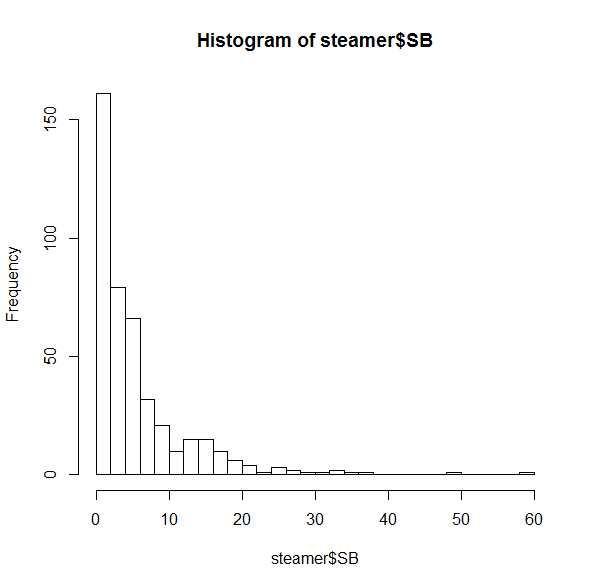
Basic histograph of SB projections

Most of these players are projected for fewer than 10 SB. This is sort of interesting, but their huge counts are keeping us from seeing the trends on the right side. Let’s zoom in a bit:

hist(subset(steamer, SB > 10)$SB, breaks=30)
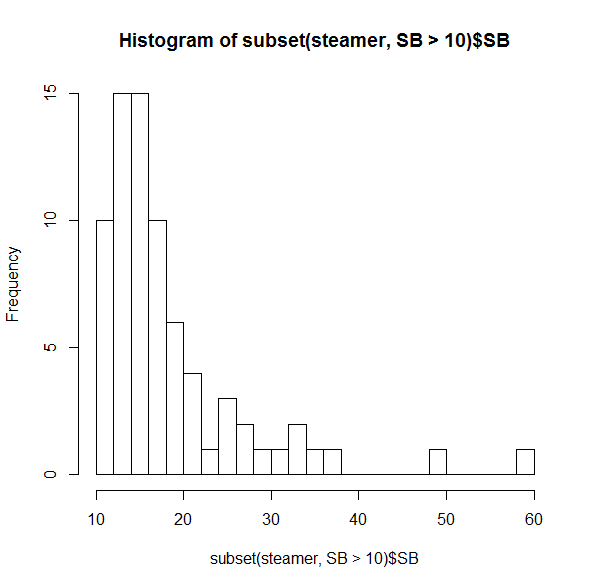
Histograph of SB projections for > 10 SB

Even among this crowd of speedsters, it’s uncommon to see someone projected for more than 20 SB, and incredibly rare to have more than 30.

You probably didn’t need to be reminded that the two folks on the far right (spoiler alert: Billy Hamilton and Dee Gordon) would stand out, though it’s useful to see just how distant they are from everyone else. But if you were thinking that players like Jarrod Dyson (35 projected SB) or Billy Burns (32) are solid, but not elite, on the basepaths, it may be time to reassess. (Did I mention that SB totals in MLB dropped 25% between 2011 and 2015?)

If you’re the kind of person who prefers boxplots instead, R’s got just the thing:

boxplot(steamer$SB)
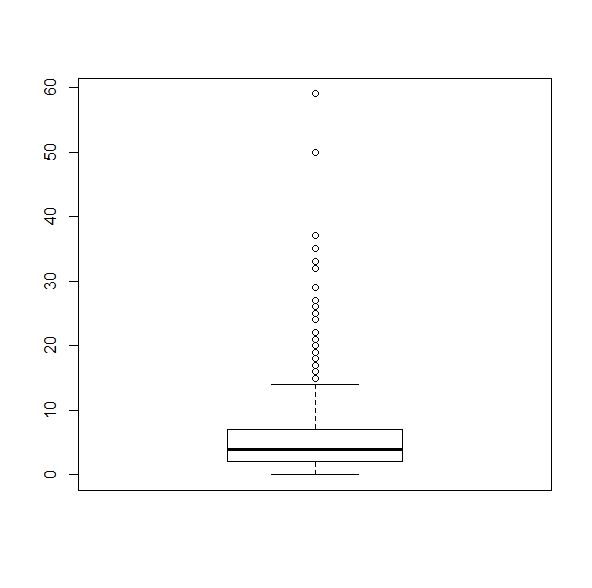
Boxplot of SB projectionsThis makes it as plain as possible that any player projected for more than about 15 SB is, quite literally, a statistical outlier.

20/20 Vision

The same idea goes for getting a grasp on multi-category players. Most of us are looking for players who can bring in both HR and SB, but how many of those are really available? Let’s do a quick 2D plot:

plot(steamer$SB, steamer$HR)
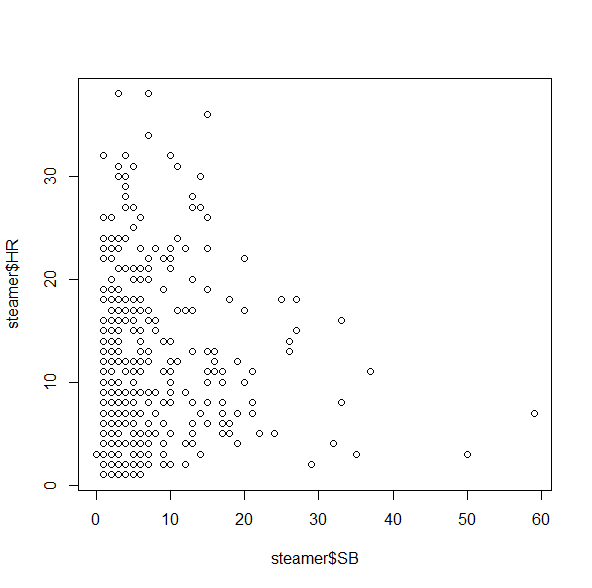
Basic plot of HR vs. SB projectionsThis isn’t bad, but unfortunately it doesn’t give us a good sense of how many players fall into each category, since there’s only one dot for all of the 5 HR/3 SB players, one dot for all the 2 HR/4 SB players, etc. A quick workaround for this is the jitter() command, which moves the points around by tiny increments to get rid of some of the overlap:

plot(jitter(steamer$SB), jitter(steamer$HR))

And, for good measure, let’s add a grid on top:

grid()

Your plot should now look something like (but not exactly like) this:
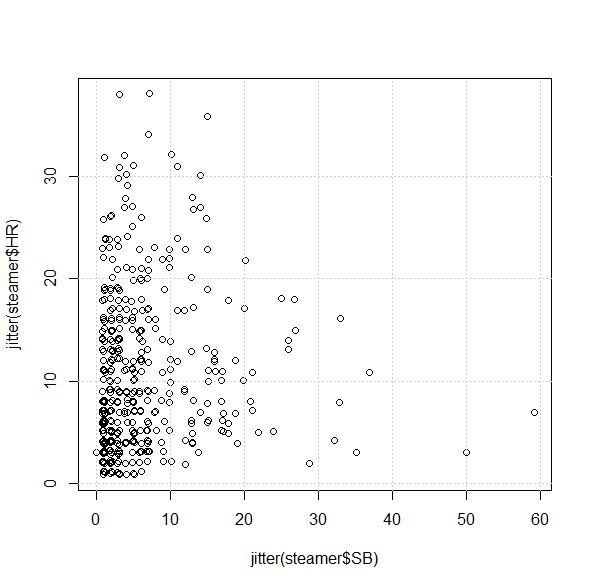
Detailed plot of HR vs. SB projections

From the chart, we can see that it’s not impossible to find players projected for 30/10 or 10/30, but it looks like there’s only one 20/20 guy in Steamer’s projections:

subset(steamer, (SB >= 20 & HR >= 20))

            Name   Team  PA  AB   H X2B X3B HR  R RBI BB  SO HBP SB CS X.1   AVG   OBP   SLG   OPS
40 Carlos Correa Astros 636 571 157  33   3 22 80  82 54 110   4 20 11  NA 0.275 0.339 0.458 0.797

Of course. As if being a 21-year-old SS with plus average wasn’t enough.

Fun With Subsets

Let’s close this out by doing a bit more with subset() — possibly one of R’s most useful tools for our purposes because it’s just so much quicker and more customizable than online tools or Excel.

Say you want to find the prospective “five-category players”; you may have a sense of who some of the candidates are, but you might be surprised by what the numbers actually suggest. How many players, for example, are projected to do better than 10/80/80/10/.275?

subset(steamer, (HR > 10 & SB > 10 & R > 80 & RBI > 80 
 & AVG > .275))

               Name         Team  PA  AB   H X2B X3B HR   R RBI  BB  SO HBP SB CS X.1   AVG   OBP   SLG   OPS
1        Mike Trout       Angels 647 542 166  32   5 36 104 104  90 138   8 15  6  NA 0.307 0.410 0.585 0.995
5  Paul Goldschmidt Diamondbacks 652 543 158  36   2 30  93  93 100 142   3 14  7  NA 0.290 0.401 0.531 0.931
7  Andrew McCutchen      Pirates 653 554 165  34   3 23  88  87  84 123   9 12  6  NA 0.297 0.395 0.496 0.891
25    Manny Machado      Orioles 663 597 170  35   2 27  91  87  53  99   4 14  8  NA 0.285 0.345 0.484 0.829

Fewer than you may expect–which could well make them all the more valuable.

Conclusion

Projections, of course, are just projections, and you shouldn’t take one set — or even a combination of sets — to be a true predictor of what will happen this season. But if you typically look up projections player-by-player, or if you’re disinclined to take in a huge wall of stats at a single glance, looking at the broader trends in individual visualizations can help keep you on the right track as you prep for this fantasy season.

Here*, as always, is the code used for this post. If you have anything else you’d like to see us do with R as the new season comes near — or any suggestions with what you’ve used R for — let us know in the comments!

*download the ZIP and extract the R file.

To Fill A Mocking Board

Spring training is happening in Florida and Arizona and as baseball players shake the rust of the off-season from themselves, so do fantasy baseball players. Fantasy drafts — be it snake or auction — will be happening soon (hopefully yours didn’t already occur!) and as such, some level of preparation would be expected. Believe it or not, there is more to fantasy baseball than mere spreadsheets, and I say that knowing full well it could cost me my job here!

The truth is perception, hype, momentum or whatever you’d like to call it can play a huge factor in determining where or for how much any given player goes for. One way of getting a firmer grip on the fantasy baseball community’s collective value on a player is to conduct a mock draft. There is no shortage of mock draft platforms around, but for the purposes of exposure to a great crowd, I’ll be overlooking the ESPN, Yahoo! and CBS mock draft capabilities. Instead we’ll be looking at some premium (read: paid membership required) websites, specifically Mock Draft Central, Couch Managers and RT Sports. And just to get in front of this, no, this isn’t a sponsored post, I promise! Now with any of these three websites you don’t need a paid membership to join a draft, but you may need one to create a custom draft.

Contestant No. 1
Mock Draft Central
Premium Options: $4.99 monthly (auto renew) OR $24.99 annually

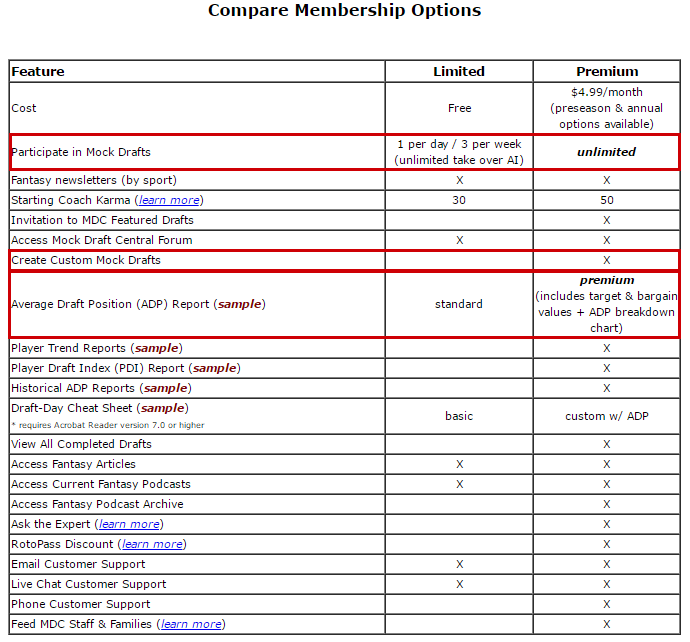
If nothing else, MDC has an incredible pre-purchase walk-through and example of options. For example, if one opts to go for the annual package, you’re given just about any level of access that a commissioner would have in a real draft. That is to say moving picks, editing or fixing picks, etc. A full breakdown of the differences are listed in this helpful chart from MDC, though it should be noted the highlighted areas were my doing.
Note: Click to embiggen any picture in this piece.

MDC

The ability to join unlimited mock drafts is great, however one per day (for a maximum of three in a week) seems like more than enough, even for the most addicted fantasy baseball player around. MDC’s “Coach Karma” is basically a way of the site protecting their users from one another. For example if you join a mock draft, but fail to show up, leaving the other mock drafters to wait while your slot gets auto picked, you’ll lose Karma. Similarly, rudeness and other poor behavior can lower your Karma as more and more users report you. There is a threshold of low Karma that if reached, will not allow you to participate in a mock draft. So basically, just follow Wheaton’s Law and you won’t have to worry about your Coach Karma. I really like the user interface at MDC, something that can’t be overstated enough as it’s intuitive and straightforward. Mock Draft Central’s ADP is currently limited to the top-255 picks, though that number can float depending on the recent qualifying mocks.

Contestant No. 2
Couch Managers
Premium Options: $2.99 monthly (auto renew) OR $9.99 annually (auto renew)

My enthusiasm for the MDC user interface doesn’t carry over to CM here. Couch Managers, despite also color coordinating things similarly to MDC, just doesn’t have the same level of eye candy.

CM1

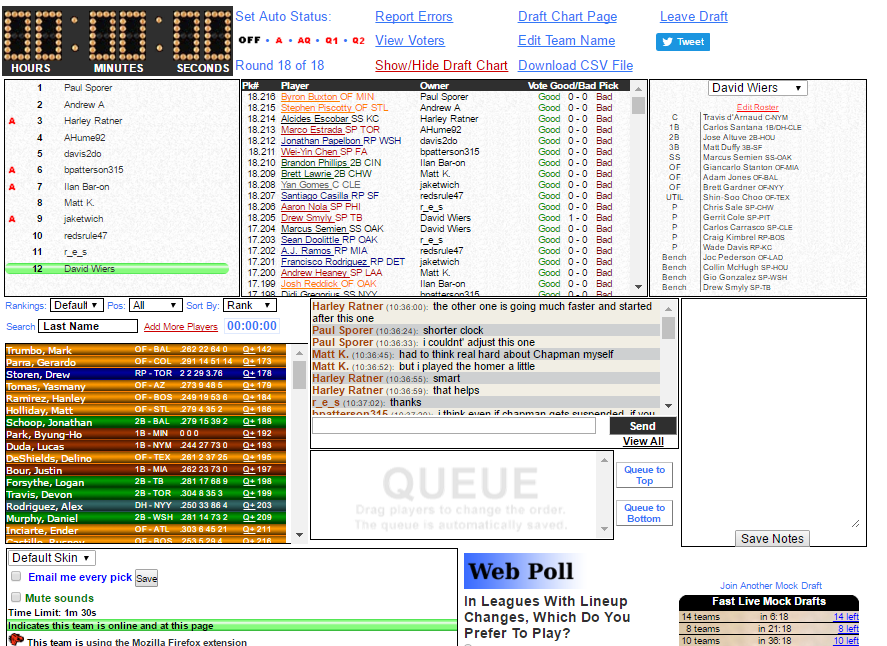
The notes section is helpful when typing on the fly, but for me, I have my spreadsheets open during the draft and can make notes or highlight things there. One thing I really enjoyed was the Good Pick/Bad Pick voting system on CM. Unfortunately during the draft you can’t see who voted for which pick, however after the draft is wrapped up there is a section to see the full break down with Good Pick votes on the left and Bad Pick votes in the right column. The ADP is limited to the top 265 picks at CM, similar to MDC where deep leagues or 14-teamers could be left out in the cold a bit.

CM2

For example, the picture above shows three Good Picks casted on the Marcus Stroman pick at 7.76 pick.

Contestant No. 3
RT Sports
Premium Options: N/A, it’s free, though regular season (non-mock draft) packages are available

Given I picked nits with the draft lobby from Couch Managers, I’ll do the same thing to RT Sports. I’d say that RT is even more boring and less visually appealing as it’s all white board with no color coded positions. The drafting itself is nice and safe in that you have to click the blue “+” sign either in your player queue or from the primary board, then click the blue draft button. Think of the “+” sign as a way to take a closer look at a player before immediately drafting them, and RT even calls the preview window.

RT

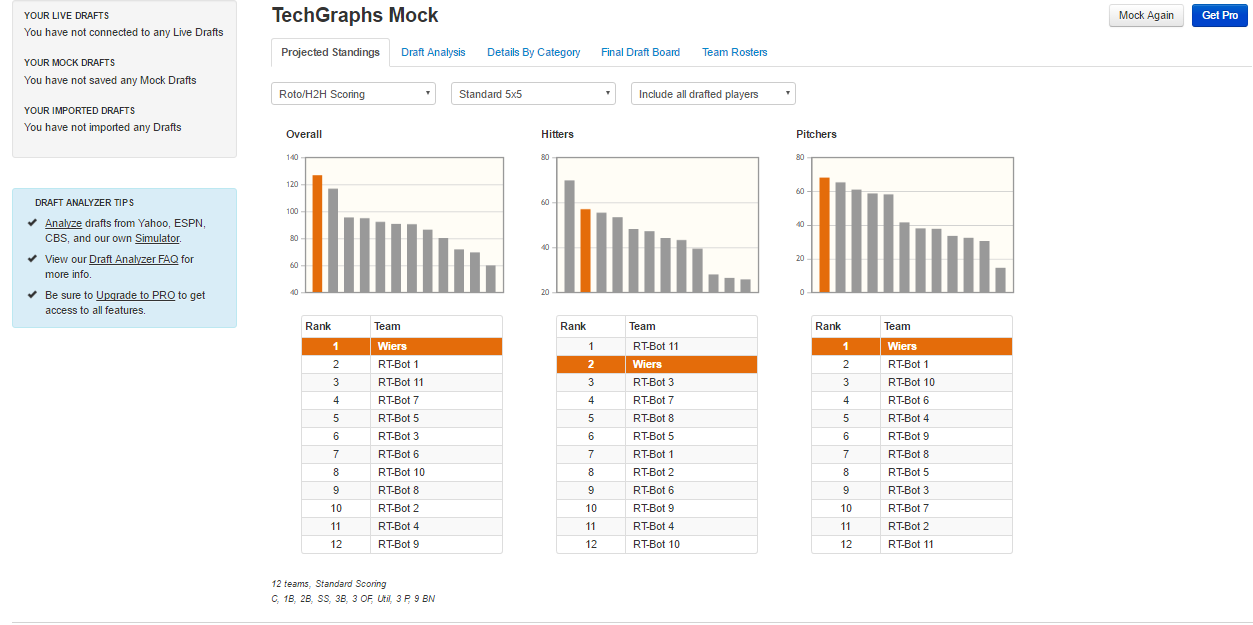
Unfortunately, along with their minimal design, RealTime Fantasy Sports also limits you to the standard 5×5 categories with no customization. That said, one of my favorite features RT Sports offers is probably the post-draft analysis. I drafted (first overall, of course) against a slate of bots and somehow didn’t manage to project to win the hitting categories, though the system loves my pitching staff.

RT1

There is a FAQ section for the numbers their projection system spits out, and I encourage you to check it out. I’ll leave the selling points of RT Sports to those lovely folks, but know that you can create mock drafts with a free, basic account, albeit only standard 5×5 format. For custom league settings, you will be required to upgrade. Really the biggest drawback to RT is probably their top-300 ADP is shown in PDF form, a sub-optimal viewing format if you’re attempting to export and compare ADP’s across different websites.

The Pick
It should be clear there are more mock draft platforms out there — many more — but I only felt comfortable discussing the ones I use semi-regularly to frequently. If I had to pick one, I like RT Sports the most, even accounting for their lack of customization. Second place would be Couch Managers, with Mock Draft Central coming in with the bronze placing.

Now, who’s up for a mock draft?

(Header image via my RT Sports post-draft board. Bots are mostly easy to pick against!)

Expanded Safety Netting: Coming to MLB and MiLB Stadiums Near You

Last summer, Oakland A’s fan Gail Payne filed a class-action lawsuit against Major League Baseball in an effort to compel the league to provide more protective netting at all ballparks, including minor-league parks, seeking class-action treatment for her lawsuit and, among other remedies, “a rule requiring all existing major league and minor league indoor and outdoor ballparks to be retrofitted to extend protective netting from foul pole to foul pole [sic] by the beginning of the 2016-2017 [sic] MLB season.” In October, MLB responded by moving to dismiss the case in its entirety.

Little has changed in the case since last fall. Payne has amended her complaint to add two other named plaintiffs: Robert Gorman, a Charlotte Knights (White Sox AAA affiliate) season-ticket holder who alleges that he and his wife have been hit by foul balls at games and is the author of Death at the Ballpark: A Comprehensive Study of Game-Related Fatalities of Players, Other Personnel and Spectators in Amateur and Professional Baseball, 1862-2007, and Stephanie Smith, a fan who alleges she was hit by a foul ball at a Dodgers game last summer. The Amended Complaint also names each MLB team as a defendant and adds a state-law claim targeting the liability-waiver provisions of MLB game tickets, as well as a simple personal-injury claim by Smith, individually, against the Dodgers. In addition, the revised pleading contains citations to more articles on baseball fan injuries; more (often graphic) photographs of injured fans; more allegations of fan injuries at games in 2015; quotations from current and former players and managers (including Detroit Tigers Justin Verlander, Nick Castellanos and Anthony Gose, former Atlanta Brave Chipper Jones, Atlanta manager Fredi Gonzalez, and Chicago Cubs manager Joe Maddon) calling for the expansion of safety netting or attesting to the dangers of sitting in unprotected areas; and an expanded section asserting that MLB failed in unspecified ways to utilize the technology at its disposal– i.e., Statcast– to protect fans, primarily citing Statcast’s ability to determine batted-ball speeds.

The defendants (with the initial exception of the Blue Jays, who later joined the motion once the plaintiffs complied with international service-of-process procedures) again moved to dismiss the case in its entirety, essentially on the same grounds on which they moved to dismiss the original Complaint.

The court was supposed to hold a hearing on the defendants’ motion to dismiss last week, but it has postponed that hearing until late March due to a scheduling conflict with the plaintiffs’ lead attorney’s family vacation plans. At a minimum, that delay offers you plenty of time to read Nathaniel Grow’s analysis of the possible application of the “Baseball Rule” in this case, and why that legal precedent strongly favors the position of MLB and its teams.

While the Payne case is stagnating (surely a relative description in the judicial context) in court, actual developments in safety netting expansion are occurring. When we last checked in on this story, there was some indication that MLB Commissioner Rob Manfred would be discussing the issue at the then-upcoming owners’ meeting. Following that November 2015 meeting, Manfred said it was “absolutely clear” that changes in safety netting would be coming, but he declined to discuss specifics at that time.

Specifics still seem to be lacking, but MLB’s recommendation, issued in December, appears to be that teams provide safety netting for all seats within seventy feet of home plate, beginning with the upcoming season. A report on a minor-league team said to be complying with the new safety directive indicated that the team would extend netting “to the end of each dugout,” referring to the end farther from home plate. (For scale, another minor-league team, the West Michigan Whitecaps, is following suit, with the distance from the center of the backstop to the far end of a dugout reportedly constituting seventy-eight feet.)  That’s what the Royals are doing as well, and that report, which states that the Phillies, Cubs, and Rays also planned to extend safety netting in response to the league’s recommendation, quoted a Royals’ executive, who said that Kansas City’s netting expansion “exceeds all of [the league’s] recommendations.” The Twins are doing the same thing, and the Rangers may be going even farther, with one report claiming that safety netting in Arlington will extend “beyond the team dugouts” (although another report has the netting extending only to the end of the dugouts).

All of the teams installing more nets in advance of the 2016 season look to be doing so to the same extent, lengthwise, but some variance remains with respect to the height of the nets, though no team yet is extending them so high as to offer protection to fans seated in upper decks — which is where Gorman, one of the new named plaintiffs in the Payne case, says he was seated when he alleges a foul ball hit him in the face.

The plaintiffs in the Payne case want the league to mandate netting expansion “from foul pole to foul pole” (presumably they actually mean two lines of nets extending outward from home plate to each foul pole, not across the outfield wall), so the new recommendation doesn’t provide them all of what they’re seeking in that regard, but it’s clear the league is trying to meet them somewhere in the middle, which is where most litigants end up.

The impetus for covering this story at this site was that the coming collision of the new safety regulations, driven at least indirectly by the Payne suit, and the interest of those fans who, unlike the Payne plaintiffs, oppose expanded netting because they believe it will significantly obstruct their view of the game (a number of whom expressed those views in the comments to our initial post on this subject) created a seemingly fruitful opportunity and incentive for innovation in safety netting technology that could increase safety while decreasing visual obstruction.

Preliminary inquiries to netting companies last year and reviews of the minimal technical specifics that made it into news stories on the subject largely were non-revelatory, but now, with expanded netting imminent at a number of MLB and MiLB parks, at least one team is taking steps to address both safety and sightline concerns through the type of netting they’re installing. From the (St. Paul) Pioneer Press report on the new nets at the Twins’ Target Field:

Despite the fact they were safely within industry guidelines set forth this winter, the Twins will replace the traditional netting behind home plate with knotless Dyneema material. They will use a thinner version of that same netting to span the remaining distance to the end of each dugout.

The dugout netting, which will be 7 feet high and require its own system of cables, is 1.2 millimeters thick as opposed to 1.8 mm behind the plate. It will be affixed to the front of the dugout roof, making it “less invasive to sightlines,” according to Hoy, and preventing fans in the front row from brushing against it.

C&H Baseball of Bradenton, Fla., the same company that installed the original netting at Target Field, will handle this project as well. Installation is scheduled for mid-March, well in advance of the Twins’ home opener on April 11, and the Twins say the cost is relatively nominal.

A 2016 C&H Baseball sales brochure describes Dyneema as an “Ultra High Molecular Weight Polyethylene” fiber manufactured by a Dutch company of the same name, whose website describes the material as “the world’s strongest and lightest fiber.” Given C&H’s position in the industry– their customer list touts relationships with many MLB, MiLB, and major college teams, and a competitor has described them as “really the last word on the subject” of baseball netting– and the indication from the Twins organization that the cost of this newer netting is “relatively minimal,” it seems reasonable to expect that more teams will be moving to knotless Dyneema, or something similar, in the near future, in the hopes of satisfying both the entertainment and safety interests at stake.

(At the time this post was published, C&H Baseball had not responded to multiple requests from TechGraphs for comment.)

With Opening Day less than two months out, let us know what changes you’re seeing at your local ballparks, and if you’re reading and commenting on TechGraphs at the game (not not recommended), be sure to keep one eye on the action too.

(Header image via Elvert Barnes)

How to Quickly Search Your Favorite Baseball (and Other Sports) Sites with Launchy

If one were brave enough to scour the Internet, one could find a myriad of articles explaining how to optimize their workflow. Our workflow is super screwed up, it seems, and only optimization will help us become the well-oiled, hyper-productive sacks of meat we were always meant to be. You can eat better, you can spend your money more wisely, you can take a more efficient way to work, and you can certainly manage your time better — again, according to the Internet. My friends and loved ones point out my shortcoming often enough that I don’t worry myself too much with my workflow. I have, however, found a few tips and/or tricks which make the act of sitting at the computer a little less terrible. One such tip is using the application Launchy to help me perform searches faster. And by tweaking the program a little bit, you can make Launchy get you your desired content from your favorite sports sites without using your mouse to dig around for those little search boxes.

Launchy can actually do a whole lot more than what I’m going to explain here. It markets itself as a “keystroke launcher,” which basically means it’s a little applet that helps you perform tasks with just a few keystrokes. You can open other programs, search for files, or play music through Launchy without ever having to touch your mouse. If you’re a Mac user, you’ve probably heard of a similar program called Alfred. Alfred has plenty of its own perks, but we’ll be focusing on Launchy since it does what we need, is free, and is cross-platform (Windows, Mac, Linux).

Download and install Launchy. By default, it should open by itself. If it doesn’t hold down the Alt key and press the Space bar.

Now that Launchy is open, let’s test some things out. Type in Google and hit tab. Then type techgraphs and hit enter. A new browser tab should open with a Google search. Now open Launchy again (Alt+Space) and simply type techgraphs.com and hit enter. It should bring you right to our home page. You can even do math in Launchy. Open it and type 4+2 and hit Enter. You should get a result. This is just a sliver of what Launchy can do, but now you know the general mechanics of the program. Now that we have that, we can start customizing.

The first thing you will want to look at is the keyboard shortcut for displaying Launchy. If you click the little gear icon you’ll be presented with the Launchy settings page. On the left-hand side, you’ll see a section to select the hotkey for Launchy. By default (as we’ve seen), it’s set to Alt+Space (on Windows), but you may want to change it to something that feels better to your fingers. It’s not necessary, but if you do feel like changing it, now you know where to do that.

(Apologies for the slightly-off screenshots. I can’t get my screen-cap software to pick up the Launch pop-up window.)

launchysettings

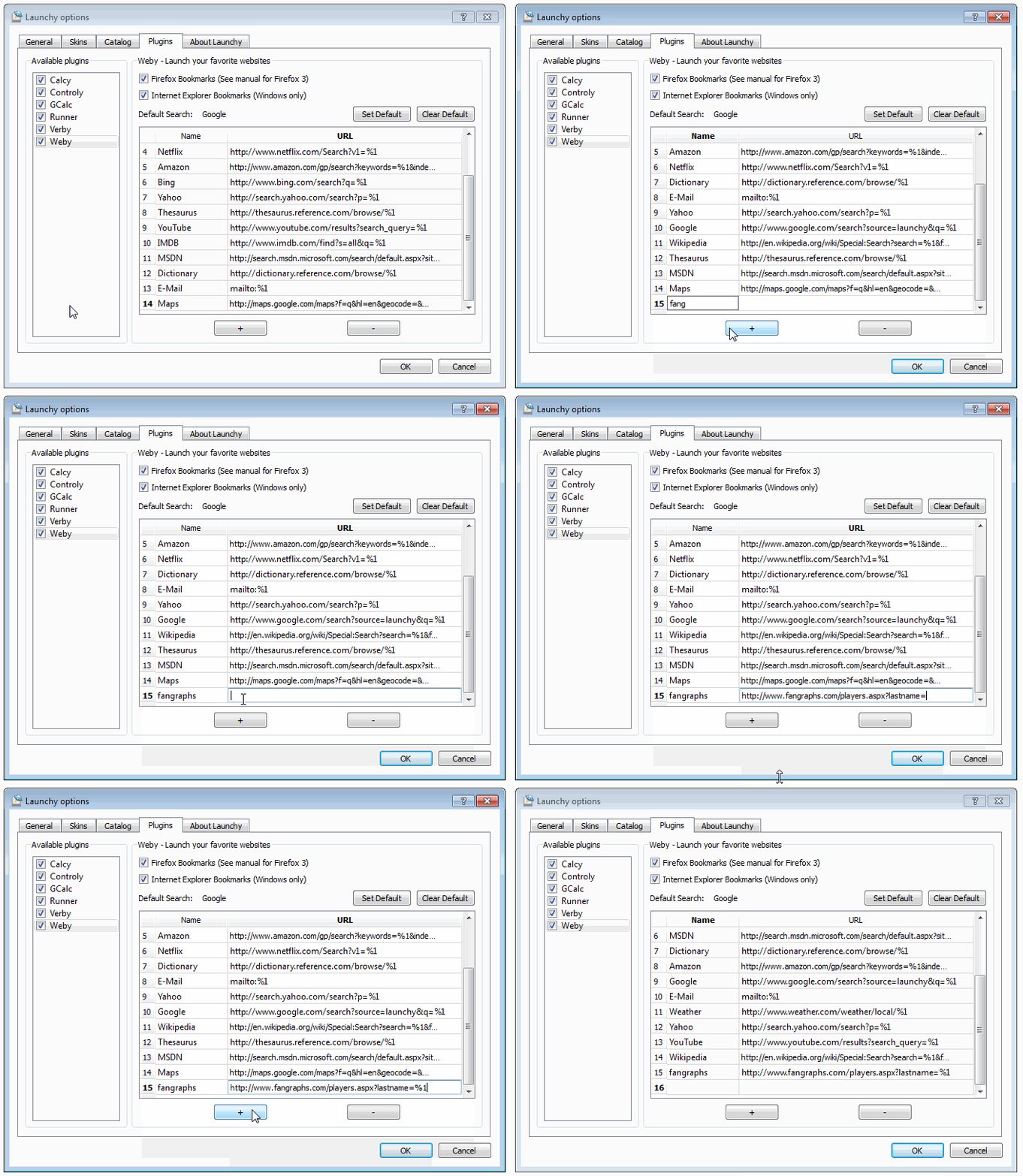
That same settings window is where we’re going to add our custom sports searches. At the top of the window, click Plugins, then click Weby from the list of plugins on the left.

webysettings

In this list you’ll see all the sites that Launchy can help you search, including some of the ones we tested earlier. These are very handy to have, but we want to add our own sites, which Launchy allows us to do. But first, we need the proper syntax. Launchy needs to know the search URL that we want in order to work properly. Let’s track one down together, like old friends. Click Cancel for now and close out of Launchy by pressing ESC.

Let’s start with FanGraphs, which my boss tells me is a fantastic baseball site. We’ll want to use Launchy to quickly search on a player, so we’ll need to start with the proper search URL. Go to FanGraphs and do a search for “Stanton.” Don’t click anything, just type “Stanton” in the search box and press Enter. In the next page, note the URL in the address bar. It should say http://www.fangraphs.com/players.aspx?lastname=stanton. Notice the last bit. The string “stanton” is passed along with the search URL. The address up to the equal sign is what we want: http://www.fangraphs.com/players.aspx?lastname=. Copy that and go back to your Launchy settings.

Back in the Weby plugin window, we’ll want to click the + sign. This will create a new entry. The name field is up to you, make it something you can remember. I use the boring but explanitory “fangraphs” (no quotes). In the address field, paste the URL you copied, and add %1 to the end (the %1 just means that we want Launchy to ask for a variable). The whole thing should look like http://www.fangraphs.com/players.aspx?lastname=%1. Press the + button again to save. Now press the OK button, which should bring you back to the main Launchy window.

webysettings2

Let’s test. In the Launchy box, type fangraphs (or the name you chose) and hit Tab. You should see the name, followed by a right-facing arrow. Now type Stanton and hit Enter. A new web browser tab should open up and bring you to the same page we saw when we grabbed the search URL. Pretty cool, right? Now, open Launchy again. Type fangraphs and hit Tab, but this time enter Giancarlo Stanton after the arrow and hit Enter. Boom, you’re brought right to the corresponding page. Pretty cool, yeah?

This only works with unique names, so searching for Alex Gonzalez by full name will still bring you to a search page where you’ll have to choose the right person.

This will work for all kinds of sites, so long as you know the search URL. Here are a few examples:

  • Baseball-Reference: http://www.baseball-reference.com/search/search.fcgi?results=&search=%1 (You can also search for specfic teams by using syntax like 2015 Royals)
  • Baseball Prospectus: http://www.baseballprospectus.com/player_search.php?search_name=%1
  • Pro-Football-Reference: http://www.pro-football-reference.com/search/search.fcgi?search=%1
  • ESPN: http://espn.go.com/search/results?q=%1

You can plug all of those into Launchy to create your own custom searches. Of course, feel free to search out your own. Just search for something on your favorite site and pay attention to the URL of the corresponding page. Copy out everything that isn’t your search term, and you should be able to plop that right into Launchy.

This is a great tool for writers, fans, or even fantasy owners during a draft. It might not save you hours off your workflow, but it will at least limit the amount of time you need to spend at your computer — an exercise that is probably killing you. Happy searching!

(Header image via Leo Leung)

MLB and Match.com Team Up

Listen, I am not — even for a minute — saying that I possess even a modicum of business acumen. In fact, I think it would be safe to say that pretty much everything I know about business comes from 30 Rock’s Jack Donaghy. I do not possess an MBA, and I have a fairly weak handshake. With that all said, the announced partnership between MLB and Match.com could make a lot of sense. However, this does not negate the fact that it all seems very silly.

People give the dating app Tinder a good deal of guff due to the perception that it is a platform merely for people looking to rub against each other in some sort of way. And while that facet of the service certainly exists, Tinder leverages an easily-trackable and simple trait for every user — proximity. When you match up with someone, you know, for a fact, that you already have something in common. This may seem oversimplified — and maybe it is — but it’s part of Tinder’s core appeal.*

*–yes, there are also photos involved, but that is included in nearly all dating services.

Services like Match and OKCupid also leverage common interests, no doubt, but they are not as instantaneous. Match is now looking to tap into that instant-match process by using baseball fandom as a variable. Using the new “Singles” (can you hear my eye rolls through the Internet?) platform, fans can combine their Match.com profiles with their team allegiances. People can search Match for others who have also designated a favorite MLB team, and, 29 team-specific portals will also be available for people to match themselves with others who also root for the same team. I really want to know which MLB team was the holdout.

Is this platform totally pointless? Probably not. Will it make these businesses money? I have no idea — see paragraph one. However, it points to a continuing trend from MLB that shows a disconnect between what MLB thinks women want and, well, reality. Hey guys! Tired of meeting women who *gasp* don’t like baseball?! Do we have the site for you! Ladies! Wanna show all the dudes out there that you are totally down to hang in a ballpark and might even eat a hot dog? Sign up below! From Match’s web site:

With over a quarter of Match members identifying as baseball fans, now’s the time to make a connection with another single fan online. Connecting over a shared passion like America’s favorite pastime is the best way to break the ice, so visit www.match.com/mlb to start your search today!

In the interest of fairness, I haven’t dated in a while. And based on what I hear from single friends, it can indeed be rough out there. But predicating a relationship based on the fact that two people like the same baseball team seems shaky at best. Plus (and I hate writing this as much as you hat reading it), sports are different. There are varying degrees of fandom, to put it lightly. A guy can check a box because he likes going to a game every now and then, where a woman who watches every game and can recite the rosters of every historic team might check that same box. There’s no sliding scale here, it’s a binary response. This can happen with other subjects as well, certainly, but there are no Match.com portals for fans of Hemingway or the movie Top Gun. Match and MLB are trying to pair people together with the help of one variable that can fluctuate immensely. It probably isn’t a recipe for disaster, but it most likely isn’t one for success either.

Who knows? Maybe this will lead to some deep and meaningful relationships. Who am I to tell people how they should look for love? But on the surface, the whole situation seems pretty phony. I mostly am worried about St. Louis fans living in Chicago and vice versa. I don’t see a whole lot of room for romance there, but it might give @BestFansStLouis some good fodder.


The Astros Hack Won’t Be the Last in Sports

Criminal charges have finally come down in the case regarding an employee of the St. Louis Cardinals illegally accessing computers belonging to the Houston Astros. Chris Correa has plead guilty and could face up to 25 years in prison for his involvement in hacking the Astros’ database. It’s a move that will hopefully deter professional sports teams from participating in this kind of behavior in the future, but one that certainly won’t guarantee it. On the contrary, these kinds of security breaches are now commonplace among corporations, and there doesn’t seem to be any discernible light at the end of the tunnel. Provisions can be made, certainly, but there’s no guaranteeing that any professional sports teams’ internal documents and information will be safe from hackers looking to make a name for themselves, or even from rival teams.

In his (Insider) piece for ESPN, Jim Bowden opines on some possible punishments for the Cardinals in the wake of the scandal. His last idea has good intentions, though the implementation is basically impossible:

New computer requirements: Manfred should put together a task force that would make sure all 30 teams have sufficient security for their baseball operations systems so that hacking is nearly impossible. These systems can either be checked on a regular basis or be monitored from a central location (i.e. the commissioner’s office).

I won’t berate Mr. Bowden on his nativity here. An understanding of cybersecurity doesn’t really fall under his job description. But this suggestion is both impossible and unfruitful. There simply is no way for an organization to absolutely protect itself against network attacks. We’ve seen hacks against the Office of Personnel Management, Patreon, T-Mobile, Ashley Madison, Hilton, and many other companies in 2015 alone. The attack vectors grow bigger and the number of threats gain in numbers every day. Most of what is considered cybersecurity these days is simply addressing known exploits. There are a varying degree of measures that can be taken against unknown exploits, but they are all difficult and the best require big-time money. A league-mandated policy on cybersecurity won’t help that. In fact, if teams are looking to protect themselves against corporate espionage, mandates are the last thing they want.

Let’s play this out a little. Say Team A wants to find out who Team B is planning on drafting. Team B has taken every (hypothetical) precaution laid out for them by the league. The problem is, Team A already knows all of these procedures. They know exactly which exploit methods to avoid and which are still left open. The road map is already drawn up. All they need to do is follow it.

It’s true that something like what Mr. Bowden is suggesting would hopefully ensure that teams act a little smarter. In fact, the exploit used against Houston was a very low-level attack. Correa essentially guessed an Astros employees’ password based on what that employee used as a password when he was previously with St. Louis. This really isn’t hacking, and it’s barely social engineering. Some guidelines from the league (who will hopefully consult with some professional security experts) could help prevent against these kinds of mishaps in the future. But if a team really wanted to get their hands on some classified information (and were willing to take the risk), it wouldn’t be all that difficult.

The FBI charges will most likely ensure that teams won’t try any shenanigans themselves, and certainly not from company computers on company networks. This does not mean, however, that rival teams or any other ne’er-do-wells couldn’t use outside sources to try and dig up secrets.

I don’t want to get too far into the nitty gritty of how the hacking community works, but suffice it to say that there are communities out there that are certainly willing to perform this type of work for a fee. Potential recruits can be found on certain IRC channels or Tor (a pseudo-anonymous network where web traffic is masked) sites and paid in Bitcoin — a cryptographic digital currency that makes transactions hard to trace. There are hackers out there for hire, to be certain, which means that teams wouldn’t even have to get their hands dirty.

And even if teams were to take measures into securing their servers and networks, there are certainly other ways security breaches can happen. An attacker could find an exploit in an employee’s home router and monitor their traffic from a car parked near their house. Man-in-the-middle attacks could be employed from a coffee shop a scout or executive visits.

And let us not forget social engineering, perhaps the most common way breaches happen nowadays. An attacker can call people around the front office posing as Todd from IT, telling people that the mail server failed and that they need their password to recreate their profile. People are still all-too willing to provide passwords and other sensitive data over the phone. Spoofing emails can be sent out with links to legit-looking websites. It usually only takes one person to give up their login information or click a link for an attacker to gain access to a network. People rarely change their passwords — and if they do, it’s often in predictable ways.

These are threats that all corporations face, not just sports teams. But it goes to show that no team is 100% safe, no matter what their respective league does or doesn’t do. In our age of prediction models and player evaluations and biometric sensors that track performance data, there is certainly a lot of juicy information that teams hold dear, and wouldn’t want other teams to see. The problem is that this information is stored on computers, and most computers are on networks that face the public in one way or another.

Is it a little scary? Certainly. Is it avoidable? Not entirely, though a hefty dose of firewall provisions, complex-password requirements, and employee training can go a long way to help prevent most attacks. But there’s no silver bullet that the league or anyone else can provide to ensure that what happened to the Astros won’t happen to anyone else. It’s part of the cost of doing business in our connected world, and probably will be forever.

(Image via Christian Colen)

Motus, Zepp Unveil New Wearable Baseball Tech at CES 2016

Motus Global and Zepp announced new additions to their existing lineup of baseball-specific wearable devices at this week’s Consumer Electronics Show in Las Vegas.

Motus Global’s system, called motusBASEBALL, is driven by a single IMU sensor. The new system can be used in a compression sleeve to track pitching, comparable to the mThrow, their existing offering. But the motusBASEBALL system can also be clipped on to a batting glove, providing feedback on a player’s swing.

“Our unique approach to the space, rooted in years of biomechanics services for MLB teams, along with the most powerful sports sensor on the market, gives our users the best chance at improving their mechanics and monitoring workloads on their joints,” said vice president for application development Ryan Holstad.

Preliminary information about the system is available on Motus Global’s website. The pitching metrics offered are very similar to the mThrow: both include throw limits based on workload, elbow and shoulder kinematics based on the single IMU worn over the ulnar collateral ligament, and a “bullpen mode” to help pitchers train.

The webpage also suggests that six metrics will be tracked for hitters: bat speed, hand speed, swing time, swing length (in inches), attack angle, and vertical angle. Metrics will be calculated separately for each region of the strike zone, to help hitters identify “hot” and “cold” regions. (Pitch locations will presumably be entered manually.)

To this point, not much has been revealed about the sensor driving the new system, other than that it has been “upgraded” over the current mThrow sensor. We can say for sure that the new sensor is less rounded than the current one. There is also a micro USB port for charging the sensor, a change from the induction charging previously used. More details will be revealed in the weeks leading up to the device launch (currently scheduled for February).

The company emphasized that motusBASEBALL was a consumer system, contrasting it with the motusPRO system unveiled during last month’s Winter Meetings. A full-body, five-sensor system, the motusPRO also transmits data via Bluetooth to a mobile phone or tablet for analysis. The system describes hitting and pitching motions through a wide range of angles, forces, rotations, and timing parameters. The motusPRO is currently available only to professional organizations, but Motus Global plans to roll the device out to select training facilities in the future.

Also this week, Zepp announced the next evolution of their bat sensor: an as yet unnamed offering embedded directly into the handle of the bat. As seen in the image above, the sensor will lock into a retention sleeve, which in turn will be fitted into the hollowed-out knob of a bat. Current offerings, which fit into flexible sleeves that slide over the knob, can move around or be knocked off by especially violent swings. Moving the sensor inside the bat should mitigate this problem.

The new design is still in the prototype phase, and no price point or release date have yet been announced. But Zepp claims to be in talks with a number of bat manufacturers to make a commercial version. In addition, Zepp announced a partnernship with New Balance, who unveiled a new digital sport division at CES.

Meanwhile, Zepp also has representatives at the annual convention of the American Baseball Coaches Association in Nashville. The goal there is to advance Zepp’s new design as an “open-source” industry standard for wearable sensors. To that end, the company will be hosting a roundtable discussion on this topic Friday.

Currently, devices like Motus Global’s and Zepp’s are not approved by MLB for in-game use. But MLB has said they are updating their wearables policy before the 2016 season. Until then, these devices can be used in practices and specific events: Zepp’s existing sensor has been used during game action at Perfect Game showcases, and an early version of the mThrow was used during 2014 fall instructs.