Archive for GIFV

Streamable Introduces Brand New Extension

We here at TechGraphs are pretty big fans of Streamable — one of the latest, and in my opinion best ways of sharing media clips, and they’ve just given us a reason to like them even more. Yesterday the company unrolled a new feature for Google Chrome users, an extension that allows users to clip video (and audio if so desired) directly from YouTube as well as Twitch.tv, and a number of smaller sites.

Being able to grab media files directly from Twitch.tv via a Chrome extension isn’t a particularly new option as Oddshot.tv has specialized in that area for months now, however support for web sites other than the esports-streaming site is a welcome sight. Unfortunately traditional sports sites haven’t caught on just yet — which should not surprise — however I’m looking forward to being able to grab a plate appearance or pitch sequence, or perhaps an incredible soccer cross and goal in near real-time.

The maximum length of the clip is 60 seconds, which is mostly enough time to capture whatever in-game moment you’re attempting to save. For the walk-through, I’ve grabbed a clip of my beloved A’s winning their 20th consecutive game, courtesy of MLB’s YouTube Channel. Before getting too far of ourselves, make sure to install the extension. It’s available for free at the Chrome Web Store and can be found by clicking here.

Once you’ve got it installed, make sure to see the Streamable icon/the infinity symbol. It will pop up on any page that is compatible with the extension, in this case the MLB channel.

streamable2

Now, after finding the clip you want — say, the glory days of seasons past — simply click on the Streamable icon and you’ll open a new page, specifically the editing page for Streamable.
streamable3

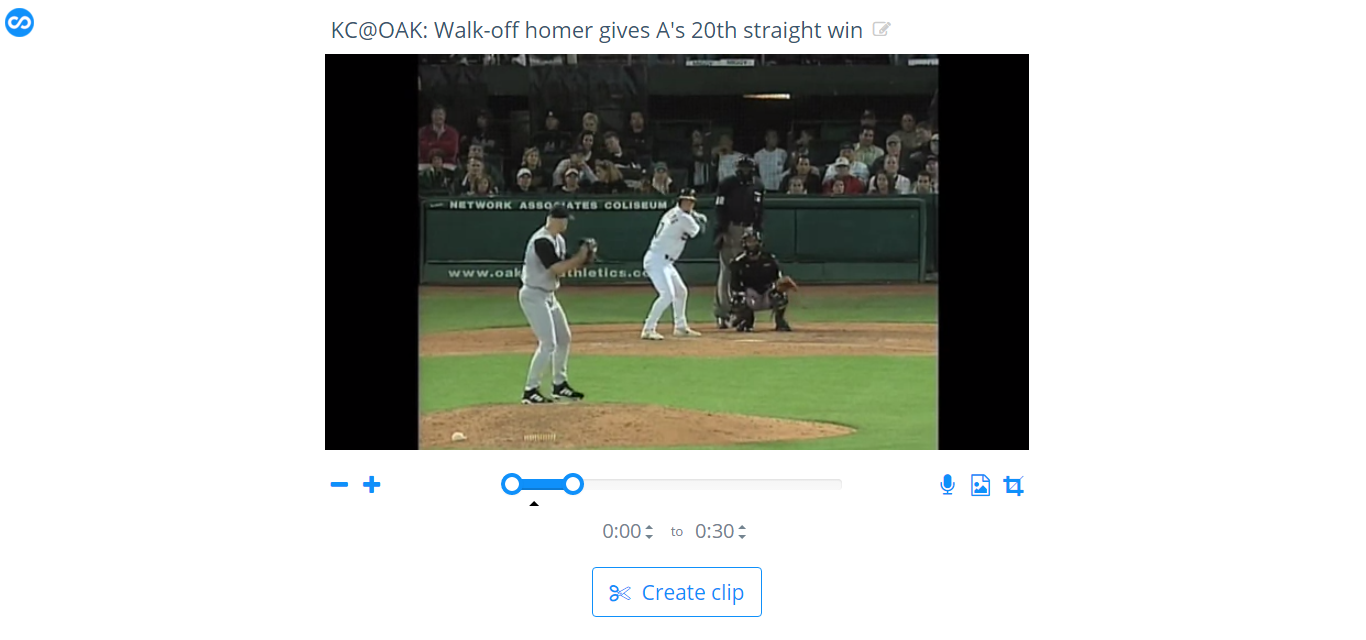
The extension allows users to re-name the clip (YouTube vids retain their name, but you can change it), crop, adjust the speed (as slow as x.50 or s fast as x2 with .25 increments) and to nail down a specific clip to one-tenth of a second of accuracy.

Note the picture below, at first glance it seems like I’m just ripping the clip, but I’ve cropped the black bars out of the original YouTube video and I’ve typed in exactly where in the video I want the clip to begin and end.

streamable4

Once the clip is finished, you’re given the direct URL or you can use an HTML embed code to share. Within the embed code options you can mute the clip, something I prefer doing because loud (not to mention auto-playing) clips are pretty terrible if you’re not expecting it. Don’t worry, muting the clip within the embed code doesn’t lose the audio. It’s just like a Vine or Instagram video where you can tap the speaker icon for the sound and full experience.

Armed with the perfect clip of the video, observe the final product:

Grab the extension and play around with it. You’ll be sharing priceless moments in non-terrible formats in no time.

Streamable Has a Simple and Quality Clip Maker

My love of GIFs stemmed from the early reaction shot days, but has since morphed into a variety of topics ranging from bat flips to goals, to, okay, still some reaction shots. The GIF is being phased out across the board as HTML5 and GIFV services are better equipped to handle a longer clip in higher quality, and recently the site Streamable has been popping up on my radar. As an inquisitive nerd, I dove right in.

Right off the bat you’re given the option upload from your computer or via URL. According to Streamable, the clips utilize HTML5, or in the rare case where that is unavailable, Flash. You’re not forced to create an account to view a clip or even to upload one, though in order to browse your own uploads it is encouraged to make a free account.

Unfortunately at this time there is no search or index option for other clips, so if you come across something you really like, you’ll need to favorite it. Say, maybe a clip of Leo Messi stealing Jerome Boateng’s soul, then chipping Manuel Neuer in the opening leg of the UEFA semi-finals.

(Editor’s note: Some Ad-Blocking extensions seem to block these embeds. If you see nothing, disable ad blocking.)

Where Gfycat doesn’t have a size limit, Imgur limits animated uploads to 200 MB. Streamable also has a limit, but it’s a 2 GB and 10 minute clip, which at 10 minutes, is longer than an average trailer and some short movies.

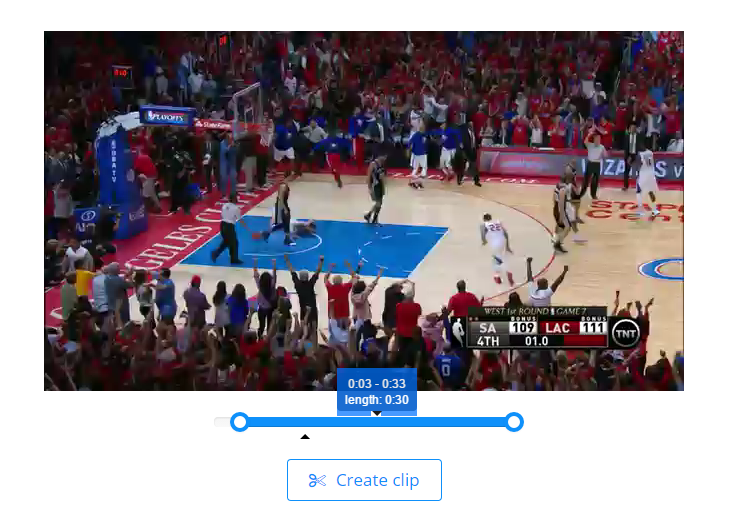
The interface is concise and uncluttered. If you choose to parse down a YouTube clip of a go-ahead shot from Game 7 of an NBA playoff series, it’s very easy. Once you have the URL, simply click “Paste from URL” and allow the clip to upload. As soon as it is in the Streamable editing system, feel free to trim it down from either side as the picture below shows.

streamable

After settling on the desired starting and ending points, click create clip and voila, you’re all set.

Streamable offers a fast and simple service and if you’re looking for a GIF-type clip but with sound — it’s the best option short of a full YouTube upload. While I’d certainly love to see a searchable index of clips like Imgur and Gfycat offer, I’ve already began to use Streamable as my go-to option for highlights, even if the highlight is against my favorite baseball team:


Is it Time to Start Replacing the GIF?

At least as far as online sports media goes, GIFs make the world go round. We use them to show bloopers and Peyton Manning faces, home runs and butt fumbles. Many writers and analysts use GIFs to help show pitching mechanics, football plays, and any other subjects that can benefit from some video evidence. It’s a useful tool, but one that’s around two decades old. Technology has better offerings now, and one of the bigger players in the GIF game is making a big change. Online hosting giant Imgur has made their intentions clear: it’s time to move on from the GIF.

The demand for higher quality and longer GIFs have surpassed the ability for the file type to keep up with us. Instead of constantly relying on the older GIF — technology has improved a bit since the 1980’s where it was first introduced — Imgur has decided to alter course and go with a much newer technology, MP4s. The media hosting site announced plans to convert all old GIFs to HTML5 compatible MP4 videos, labeling the files as the all new GIFV file type.

The new files are smaller, creating less strain on Imgur, load faster on mobile devices and are able to viewed on any platform. Another hosting site, Gfycat, has been using HTML 5 for months now and their home page even sports how much bandwidth they’ve saved using HTML 5 rather than GIFs. There is a worthy debate going on as to why Imgur decided to go with the MP4 format rather than WebM and the probable answer is compatibility. At the time of writing. WebM is not available on any iOS version without downloading a free video player, unless you choose to jailbreak your device. Rather than force a large user base to download compatibility apps, Imgur has taken a shorter and faster route to replace the GIF.

For a comparison of GIF vs HTML 5, look no further than Gfycat’s FAQ page. The length and quality — not to mention the ability to pause, rewind or view frame by frame, it’s an MP4 video, remember? — are identical and the HTLM 5 is much smaller than the GIF.

Don’t expect GIFs to disappear overnight, they’re too well established for that, but anticipate more and more websites moving to the MP4 or GIFVs. They’re superior to GIFs in every way and are compatible on all devices. If WebM becomes the new standard video type then perhaps Imgur will once again change, but for now their strides to replace the GIF are already underway.